Airplane Engines

Introduction

Most small airplanes are powered by piston engines. Car engines are sometimes used for kit or experimental airplanes. It seems like a logical thing to do since most car engines are reliable and less expensive than aviation engines. Yet while some car engines have performed well in aviation, they are the exception that proves the general rule to the contrary.

Here I’ll discuss some of the important ways in which airplane engines are different from car engines.

Rotational Speed

A typical prop for a small airplane has about a 76″ diameter (more or less). That’s a circumference of about 20′, which is how far the tips move in each revolution. The speed of sound is about 1100′ per second (sea level standard conditions), so that’s 55 revolutions per second, which means at 3,300 RPM the tips of the prop are moving at the speed of sound.

When the tips move faster than about 85% of the speed of sound, they start to lose efficiency. The airflow changes and they start making more noise & turbulence, and less thrust. And it creates unnecessary stress on the prop. So we need to limit the prop to about 2800 RPM. But we need to limit a bit more than that, because the airplane flies at high altitude where air is colder and sound travels slower. So typical small airplanes like this have a prop redline of 2700 RPM, plus or minus (lower for bigger props).

Power moves the car, or the airplane, or anything else that moves. In an engine, power is torque * rotational speed. Cars have a transmission enabling the engine and wheels to spin at different speeds, so they can rev up the engine to make good power, then gear it down to the wheels to maximize performance. To avoid the complexity, weight and reliability issues of a geared engine, in most airplanes the prop is bolted directly to the engine crankshaft. Thus, limiting the engine to 2700 RPM limits the power it can produce.

Consequently, most aviation engines don’t make much power for their displacement (for example the popular Lycoming O-360 which makes 180 HP from 360 ci), but they are designed to produce their rated power continuously while being lightweight and reliable.

Duty Cycle

Cars spend a lot of time in traffic constantly changing speeds. And cars rarely use their full rated power, but spend most of their time producing only a small part of it. For example, it takes about 30 HP to move a typical car down the freeway at 60-70 mph. For a car with a 150 HP engine, that’s only 20% of its rated power. A car engine is optimized for this duty cycle: to be efficient and reliable while producing a low % of its rated power.

Airplanes spend most of their time in cruise flight moving at a constant speed. The engine is running at a constant speed at or near wide open throttle, producing a high percentage of its rated power. For example, cruising at 70% power is typical. Airplane engines are designed to operate efficiently and reliably while generating their full rated power.

Lightweight

The value of light weight in an airplane engine is obvious. Consider the Lycoming O-360 mentioned above. It is a large displacement 360 ci engine that weighs only 260 lbs. A typical car engine of similar displacement weighs more than twice as much.

Of course, that 360 ci car engine would produce more than 180 HP. So for a fair comparison consider a modern car engine making 180 HP, like the Mazda Skyactiv 2.5. It produces 180 HP and weighs 260 lbs. In power and weight it’s similar to the Lycoming. But that Mazda is not designed to produce its rated power continuously. If you ran it constantly at wide open throttle at 6000 RPM it would not last very long.

It’s not easy to produce a lightweight engine that can operate reliably while continuously producing its full rated power. From a power / weight / reliability perspective, the Lycoming O-360 is comparable to modern car engines in 2022. This is especially notable when one considers that the Lycoming is a design from the 1950s.

Efficiency

Modern car engines are fully computer controlled. The driver applies a certain amount of throttle, and the engine computer determines the valve timing, spark timing, air/fuel ratio, etc. and constantly changes or adapts these settings to the conditions.

Airplane engines are manual. The pilot sets the throttle, RPM, and mixture manually. How can a human compete with a computer? Pretty well, it turns out, because the airplane spends most of its time in cruise flight, running at a constant power level, RPM, and altitude. This gives the pilot time to carefully optimize these settings and leave them there for hours.

One way to measure efficiency is miles per gallon. That Mazda gets about 40 miles per gallon on the freeway. A Cessna 172 in cruise gets about 18 miles per gallon. The Mazda wins, right? Well, it’s not really a fair comparison because the Cessna is going twice as fast. If you drive that Mazda twice as fast (say 130 miles per hour), it’s going to get about 1/4 the fuel economy, which is 10 miles per gallon (or less). So at the same speed, the airplane is almost twice as efficient. Indeed, other airplanes like Mooneys are far more efficient than the Cessna.

Yet this method of measuring efficiency is more about air resistance or drag, than the engine. Airplanes are just inherently more efficient than cars. What if we ignore that and focus on the engine itself?

Another way to measure efficiency is BSFC: brake-specific fuel consumption. That is, how much fuel does the engine consume to do a certain amount of work? One way to measure this is horsepower per gallons per hour.

Let’s estimate this for the Mazda. Suppose it’s getting 40 miles per gallon at 65 miles per hour. Each hour it burns 65/40 = 1.625 gallons of gas. Traveling that fast takes about 30 horsepower, so it produces 30 / 1.625 = 18.46 HP per gallon per hour.

Now consider the Cessna 172. It’s getting 18 miles per gallon at 130 miles per hour. Each hour it burns 130/18 = 7.2 gallons of gas. But how much horsepower is it generating? That is about 65% power, which is .65 * 180 = 117 horsepower. It produces 117 / 7.2 = 16.25 HP per gallon per hour.

So here the Mazda engine is about 13% more efficient (18.46 versus 16.25). However, keep in mind that this is when producing only 30 / 180 = 17% of its rated power. The Lycoming was producing 65% of its rated power. When you open the throttle to make the Mazda produce 65% of its rated power, its efficiency drops significantly, well below the Lycoming.

Note that each engine, car or airplane, is more efficient than the other when operating within its typical duty cycle.

Reliability and Durability

If an aircraft engine fails in flight, the airplane stays in the air but not for long; it becomes a glider that is going to land somewhere very nearby, very soon (within minutes), and most likely off-airport. It is an emergency situation that can lead to injury or death. If a car engine fails, you coast down and simply pull over to the side of the road. It’s an inconvenience, not an emergency.

Airplane engines are designed for reliability. Their spark plugs are powered by magnetos, so (unlike a car) the engine keeps running even if the electrical system fails. Each piston has 2 spark plugs, so if one fails, the piston still produces power. They have 2 separate magnetos and half the plugs are fired by one magneto, half by the other, so if one magneto fails, the engine keeps running. They are air cooled, so there is no water pump that can fail, no radiator that can leak. Also, they spend most of their time in cruise operating around 2500 RPM, so they have static spark timing optimized for that speed – no need for timing advance means simplicity and reliability.

Plenty of historical examples demonstrate the problems using car engines in airplanes. In the 1980s, Mooney made a plane that was optionally powered by a Porsche engine. It had so many problems, the changes needed to make that engine reliable in aviation were so extensive, Porsche gave up and discontinued it. Thielert had a similar situation building Mercedes diesel engines for aviation use. You can google the details on these and other examples.

Yet how do we reconcile this history with the fact that aviation engines use technology that is more than half a century old? A pilot’s pet nickname for Lycoming is “Lycosaurus”!

Consider how any engine becomes reliable: start with a good design, then tweak a little it every year to address any problems discovered in the field. Cars follow this pattern. They come out with a new engine, the first year has some issues, each year it gets a little better, then 5-10 years down the road, just when the engine is reaching its peak, they scrap it and start all over with a new design incorporating new technology. Imagine how reliable car engines would be if they never scrapped it, stuck with the design and continued that incremental improvement for 50 years. The engine would be “low tech” for sure. And may not be as efficient. But reliable? You betcha – they’ve seen just about every failure there is and incorporated changes to address it.

This is what a typical Lycoming or Continental certified aircraft engine is: the result of more than 50 years of incremental improvement on a design that was pretty good to begin with. It’s ancient technology, yet it’s highly optimized and adapted in an incremental, evolutionary way.

Production

Last year, Mazda built more than half a million engines. Lycoming produced about 4,000 engines. Yet this difference of more than 100:1 understates the difference, because there are many car manufacturers while there are only two manufacturers of certified aircraft engines: Lycoming and Continental. For each aircraft engine built, more than 1,000 car engines are built.

To produce reliable engines at such low volumes, aircraft engine manufacturers use completely different production methods. Each engine and all the parts in it are individually hand-built, inspected, and tested before leaving the factory. Visit a modern car engine factory and it looks like a scene from a sci-fi movie where robots have taken over the world. Visit an aviation engine factory and it looks like you’ve gone back in time to a boutique hot rod custom engine building company.

Conclusion

Cars and airplanes are completely different applications with different requirements. It should be no surprise that engines optimized for one are not well suited to the other. High technology is not and end, it is a means to an end. The end or goal is meeting the requirements for the application. Pilots building their own kit / experimental airplanes can use any engine they want. Yet most of them still prefer certified aviation engines from Lycoming or Continental, despite the high cost and low technology compared to car engines. This is not irrational, but backed by some of the reasons discussed above.

All that said, much of the reason aviation engines are so low tech and expensive, is certification. The cost to certify an aircraft engine is so high, and production volume is so low, they can never break even on a new engine design. Over the years, this forced them to differentiate and improve their products with incremental tweaks to existing designs. One can view this as an unintended consequence of over-regulation: certification rules that were intended to promote safety, led to technological stagnation. Or, one can view it as a beneficial outcome that optimizes for reliability in their intended application, which is crucially important with aircraft engines.

Mazda 3 Racing Beat Exhaust

Last year I upgraded my Mazda 3’s suspension, making it much more fun to drive. The only springs I could find that were made for performance, not for looks or lowering, were from Racing Beat. I used Racing Beat parts back in the 1990s autocrossing my 3rd gen RX-7, so I knew they were top quality.

I also wanted a tuned exhaust. Sure there are plenty of aftermarket exhausts for the Mazda 3, but most are just loud; they are not tuned. I didn’t expect big gains because most cars are well tuned by the factory – but at least some gains would be nice. The Racing Beat exhaust meets both requirements: it’s barely louder than stock, and is tuned providing marginal gains. They dyno tested it and published the results. It’s not much of a gain, but still more than I expected.

1665788489806.png

This is the same exhaust that Mazda provided as an OEM part on the limited “club” version of the car. Power gains through tuned exhaust are achieved through increasing volumetric efficiency, so one can expect slightly better fuel economy too. But it was unavailable – out of stock. I signed up to get notified and waited…

Finally, in Oct 2022 it became available and my order went through. It took just a few days for it to arrive here in Seattle. It’s a giant size box that cost over $100 to ship via UPS. Fortunately, Racing beat doesn’t charge tax outside CA state. So the total price was $696.

Installation

The exhaust comes with new nuts, bolts & washers, and a new seal, to attach to the car’s exhaust pipe. Quality is top notch, better than OEM. Installation took less than an hour, including the time to jack up the car and clean up afterward. I sprayed liquid wrench on the original exhaust pipe nuts, but they were not frozen in place. Summary of installation:

  • Jack up the rear of the car safely with jack stands.
  • Remove the 2 bolts securing the muffler to the tailpipe.
  • Spray the muffler’s 4 rubber hanger joints with WD-40 to lube them.
  • Jack up the old muffler in place so it doesn’t fall when you unfasten it.
  • Unfasten the 4 rubber hanger joints and remove the old muffler.
  • Hang the new muffler on the 4 rubber hanger joints.
  • Secure the new muffler to the tailpipe using the new sealing washer, bolts, washers & nuts.
  • Ensure the muffler is properly centered and secured.

Fit and Finish

The new muffler is better than OEM quality. It weighs about the same. The tips are larger diameter and fill the circular bumper curves with about 1/2″ of clearance, just enough that they won’t touch as it vibrates over bumps. The fit is perfect. When the muffler’s circular metal hanger studs are properly inserted into the rubber hangers, it’s perfectly positioned and centered without any finagling or tweaking. The muffler’s connection to the car’s existing tailpipe is perfectly positioned and angled. Its exterior dimensions are similar to the original so it doesn’t conflict with any of the hardware under the car.

Sound

I’ve installed aftermarket exhaust systems on several bikes & cars in the past. This is the quietest that I have seen or heard. It’s almost indistinguishable from stock when putt-putting around town. When you apply full throttle, it’s just a touch louder than stock but only slightly. Many other cars are louder than this with their factory exhaust.

Yet what is a bit different is the tone quality or timbre. This exhaust suppresses the higher frequencies, producing a lower pitch with a touch of rumble. I say just a touch because you are never going to get much rumble with a 2 liter 4 cylinder engine.

What is pleasantly missing from the sound is drone. There is none.

That said, the stock exhaust doesn’t sound bad. It is clean with no rattle and, unlike most other economy cars, sounds like the engine wants to be revved. This Racing Beat exhaust adds some depth to the sound without being loud or obnoxious. It’s a subtle tuned exhaust for adults.

Performance

Shown above, the performance gains are marginal. The gains are smooth and consistent through the entire RPM range from 1500 RPM to redline. The shape of the curve is not changed, with peak torque between 4000 and 5000 and peak power at 6000. The peak increase in torque is about +8 ft.lbs. at 3000 RPM, or about +6%. The peak increase in power is about +5 HP from 5500 to 6500, or about +3%. That’s small enough, any difference you think you feel is placebo. But with small engines like this, I’ll take any advantage I can get.

Conclusion

With a subtle sound that enables you to get on the throttle without blushing, the Racing Beat exhaust is suitable for daily driving. The marginal gains in torque & power, and the appearance and sound add a bit of fun. With quality better than OEM it’s a lifetime part. No doubt this is the best aftermarket exhaust for the Mazda 3.

However, the pragmatic view is that even a well tuned aftermarket exhaust doesn’t make much difference in performance. If you’re autocrossing or racing this isn’t going to improve times by any appreciable amount. And it’s expensive. When it comes to adding fun to your car, or improving your autocross or track times, the biggest bang for your buck is suspension upgrades. Do that first. After that, the Racing Beat exhaust is for when you still want that extra smidge of fun and are willing to pay top dollar for it. Or, if for some reason you need to replace your OEM exhaust (maybe it started to rust), you might as well upgrade to this one.

Postscript

What to do with the old/OEM exhaust? You could keep it, but you’ll probably never need it again so it’s just another large thing to fill up your garage. You could throw it away as trash, but it’s big & bulky enough that’s going to cost you. And, what a waste that is. I thought of two better options:

  • Give it someone who needs it. The Mazda 3 is a popular car, somebody, somewhere, needs an OEM exhaust in serviceable condition.
  • Take it to a salvage or scrap yard. They’ll pay you for it. And it will either be recycled, or put back into service on another car.

I called around and none of auto salvage yards in my area wanted a muffler – they only accept entire cars. So I took mine to Schnitzer scrap metal recycling in Woodinville. They pay about $3.50 per 100 lbs. so the muffler is only worth about a buck. But that beats paying $30 or more just to dump it in the trash.

Keyboards: Clickiez!

On a recent day at work my friend Joe dropped by with a new keyboard he built. “Try it out for a few hours” he said. It weighed half a ton and had an unusual layout, smaller than an 87-TKL 80% keyboard. I plugged in its standard USB cable and as soon as I hit a few keys my jaw hit the floor and a flood of nostalgia tickled my brain. I was back in the UC Davis computer lab in the 1980s on a VT-320 terminal connected to a PDP-11 running Unix. I had forgotten how much I loved those keyboards, even more than the buckling springs that my 4.77 MHz Leading Edge Model D, and most other PCs, had at the time.

Turns out Joe built that keyboard with Clickiez switches. They’re amazing!

They are rated at 40 grams actuation, but this is misleading because it’s not peak actuation force. I measured by stacking pennies on them and got 70-75 grams. This is the same as buckling springs or Cherry MX Greens, a bit heavier than normal clicky switches like Cherry or Gateron Blues. Clickiez makes a heavier version, but don’t bother. 40 grams sounds too light but it’s not really 40 grams and it’s perfect.

The sound is quite unique. Compared to Cherry or Gateron clicky switches, they’re quieter and lower pitched with more of a “thwock” than “click-tick”. The tactile feedback is far superior to anything made by Cherry or Gateron. Crisp, definite, solid and consistent. This is an unbeatable 1-2 punch. These are the best switches I’ve ever typed on.

These switches are compatible with Cherry and Gateron. Same physical dimensions, same pin-outs. You can get a hot-pluggable keyboard with Cherry or Gateron switches and swap them for Clickiez. However, each Clickiez switch top-case has a slightly different shape than Cherry or Gateron, which may conflict with some kinds of key stabilizers. I didn’t run into this, but beware.

Another unique aspect of these switches is they can be configured in 3 modes:

  • Clicky (default): medium force, crisp, tactile
  • Tactile: slightly heavier force, slightly quieter, less crisp, more tactile
  • Linear: lightest force, quietest, not clicky, not tactile

In addition, you can choose to lube them, or to use o-rings on the key-cap stems. Joe loaned me his leftover switches and I tried all combinations. I didn’t like the lube. Makes them just a tad lighter, quieter, softer and less crisp. It doesn’t seem like a big difference with a single switch, but when you do an entire keyboard, it’s huge – it completely transforms the feel. Some people might like it, especially if they’re used to laptop or bubble dome keyboards. The problem with lube is once applied, it’s virtually impossible to fully remove. So test it first! Key-cap o-rings make them a tad quieter with less harsh bottom-out and shorter stroke. No change in the weight or crispness. Tactile mode feels a bit wonky to me. I prefer the crispness of the default mode, and it’s plenty tactile.

NOTE: to reconfigure Clickiez switches you must pop open the switch case, remove & re-install the metal click-plate in a different position, then snap the switch case top back on. It helps to have 2.0x magnification, and before you reinstall the switch case top, gently bend the 4 snap prongs inward to ensure a snug fit.

I couldn’t resist – I had to have a keyboard with these switches! Joe recommended a DIY kit keyboard, but they were expensive. I love his custom-made half-ton keyboard with its thick slab of metal baseplate, but it’s not for me. For a daily driver I had to have something more conventional and budget-friendly. So I ordered a set of 90 Clickiez switches and bought a high quality hot-swappable 87-TKL layout keyboard with Gateron switches. Total cost for both was about $250. I pulled the Gaterons and installed the Clickiez in their default configuration.

Michelle had an old keyboard with Cherry Brown clone switches that was starting to die. I let Michelle try my new Clickiez keyboard. She loved it so I told her keep it, I’ll build another for myself. It also has the advantage of wired USB instead of wireless, which is simpler with superior response.

So I put in another order and built a second for work. I installed o-rings on the key-caps but it’s still a bit loud for typing on Zoom calls. As I type for extended periods of time, there’s no finger or hand fatigue. The o-rings help there, as they soften the bottom-out of the keys.

Note: I got a Keychron Alice layout keyboard for work, and added ZealPC V2 Zilent switches. These are a silent tactile switch, great for Zoom calls and not annoying your work neighbors. I use the Clickiez at home.

I still love buckling springs and use them at home. A while back I compared them to Cherry Blues: http://mclements.net/blogWP/index.php/2021/10/19/keyboards-cherry-blue-vs-buckling-springs

Compared to Clickiez, buckling springs are a smidge heavier in actuation and a lot louder with a very different timbre. The Clickiez are so different it’s hard to say which is better. Suffice to say Clickiez are the only switch that even comes close to buckling springs. Both are leagues ahead of anything from Cherry or Gateron. One advantage of hot-swap switch sockets is the modularity makes it a “forever” keyboard. If any switch ever fails, simply replace it. Can’t do that with buckling springs. Some have said the Clickiez are unique but not necessarily a daily driver kind of switch. I disagree and find them most excellent for all-day use.

References / links:

Clickiez switches: https://zealpc.net/products/clickiez
87-TKL Keyboard: https://mechanicalkeyboards.com/shop/index.php?l=product_detail&p=9270
Alice Keyboard: https://www.keychron.com/products/keychron-v10-alice-layout-qmk-custom-mechanical-keyboard

WRIAD: White Rim in a Day

Summary

The White Rim Trail is SW of Moab Utah. It follows the Colorado River SW to its junction with the Green River, then NW up the Green River, making a rough “V” shape, then a mix of dirt & paved roads connect the top of the V. It makes a loop measuring 100 miles, about 8000′ of cumulative climb. The trail ranges from simple dirt/rock, to sand, to rugged steep technical with big rocks. Along the route there is no food, water or services. And mostly no cell/mobile coverage.

Most bicycle tours take 3-4 days to do this trail, supported with 4WD vehicles providing food, water and shelter. It is possible to ride it in a single day, but it’s a big physical effort that also takes some planning. It helps to have a gung-ho friend named Stefan to convince you to ride it with him.

Stefan rode WRIAD solo in Oct 2020, and he and I rode it together in Oct 2022. This describes what it was like and how we prepared for it.

Pics here: http://mclements.net/Moab-202210/

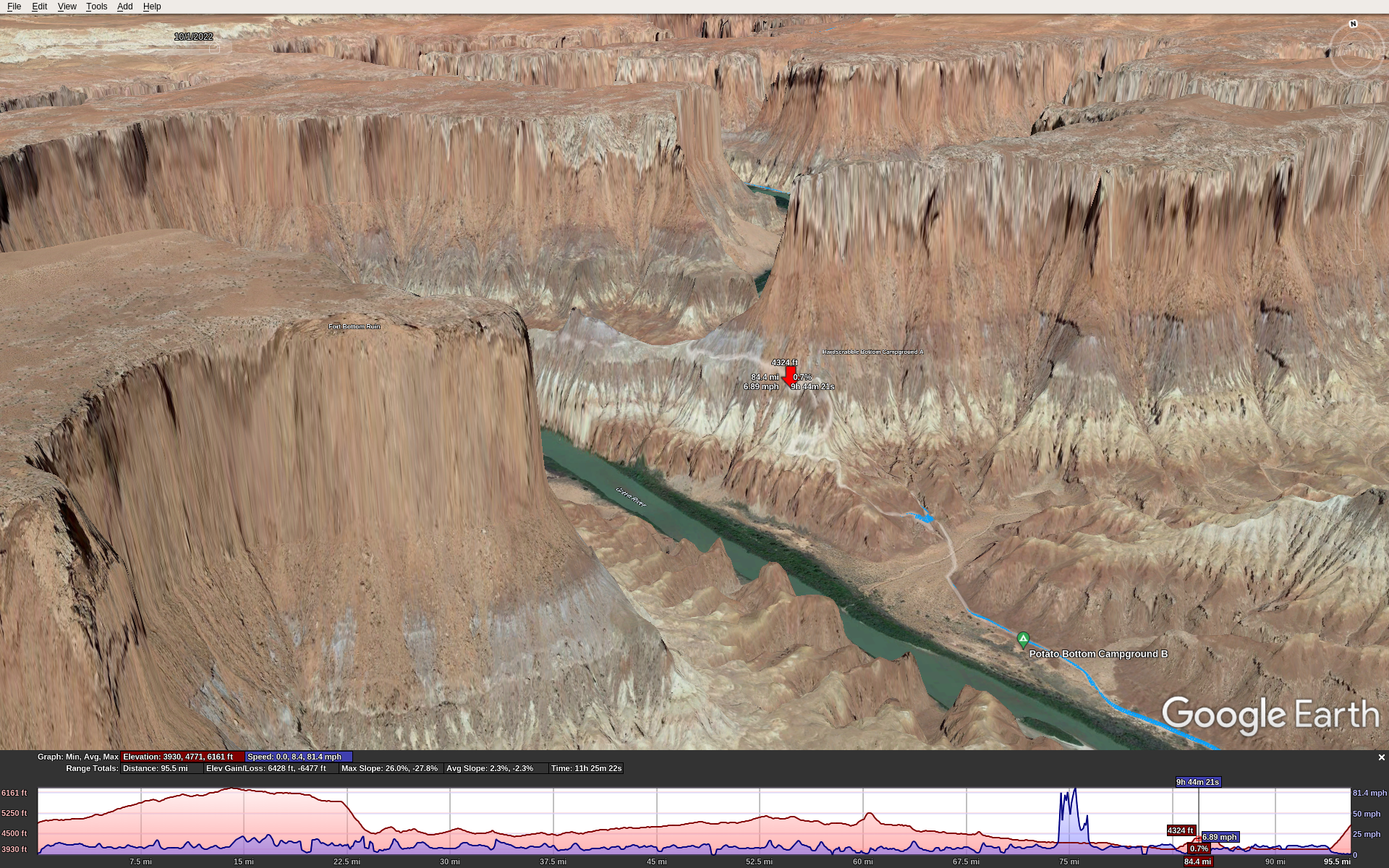
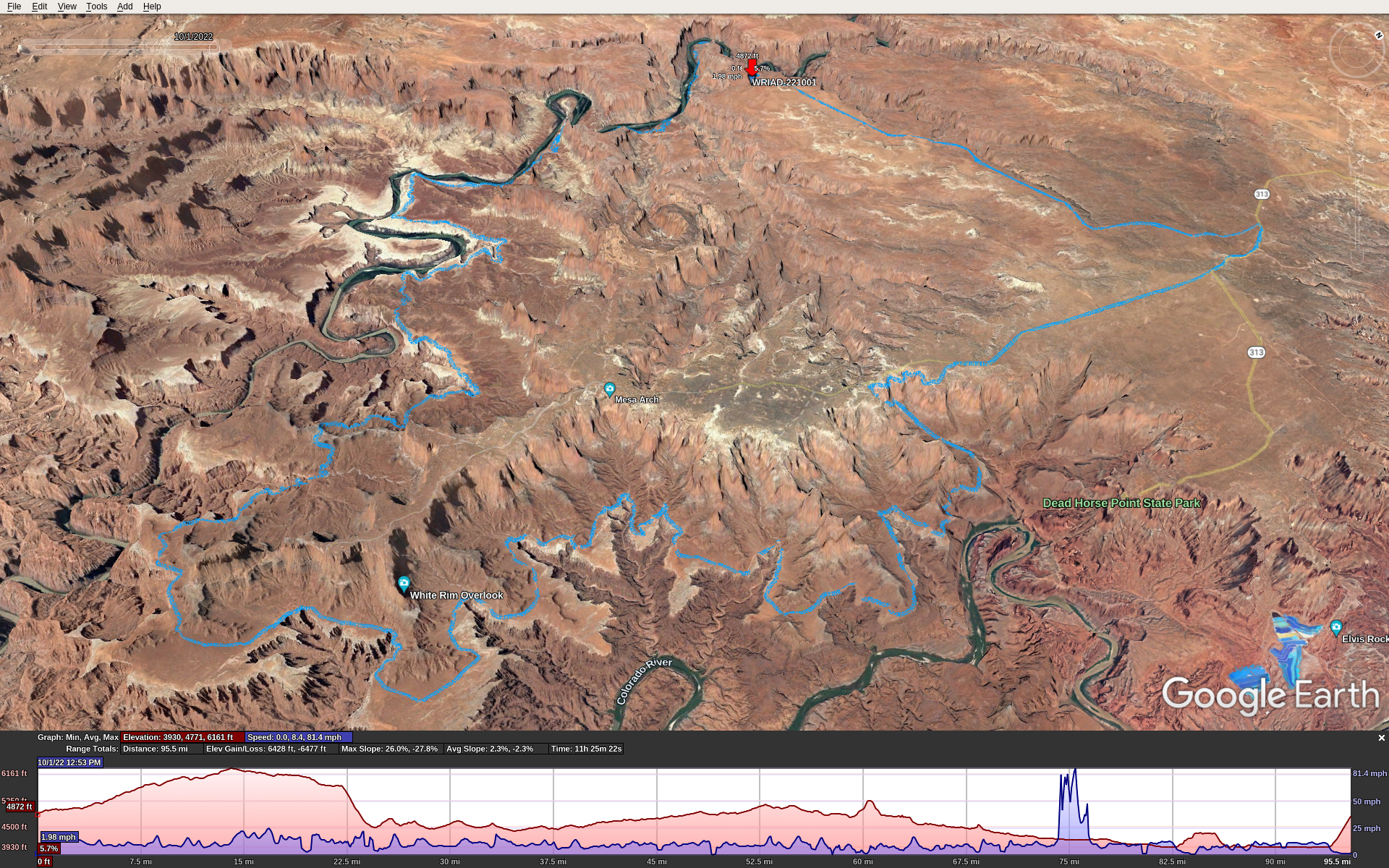
Here’s the GPX track overlaid with Google Earth, which underestimates the mileage and elevation because it over-smooths and simplifies the track. The red flag is our start/end point. The spike in speed around mile 75 is a GPS glitch.

Preparation

I’ve done some big tough MTB rides over the years. La Ruta, Kokopelli’s Trail, OTGG, and others of Stefan’s and my own devising. From a fitness perspective I knew what to expect. It takes several months to a year of serious training to get into the best physical fitness you can. You’re going to be pedaling for 10-12 hours over rugged terrain, miles of tire-sucking sand, and incredibly steep grades (> 25%) that make its 100 miles feel more like a 200 mile road ride.

The best time to ride WRIAD is in spring or fall. This means near the equinox, so you’ll have about 12 hours of daylight.

You need a day-use permit that you can get a day or two in advance, cost about $6. And you need to pay another $15 to enter the national park.

Plan on 11-12 hours total if you stop only once or twice during the ride. That means enough food and water to carry you through. Everyone is different; here’s what worked for me. I had 224 ounces of water: two 100 oz camelback bladders, plus a 24 oz. water bottle. I used all but 12 ounces of it. For food, bring some real food for lunch (sandwich, burrito, etc.) and about 240 cals per hour to eat while you’re riding. Have this food ready to eat while riding because if you stop to eat every hour, you might not finish the ride in daylight.

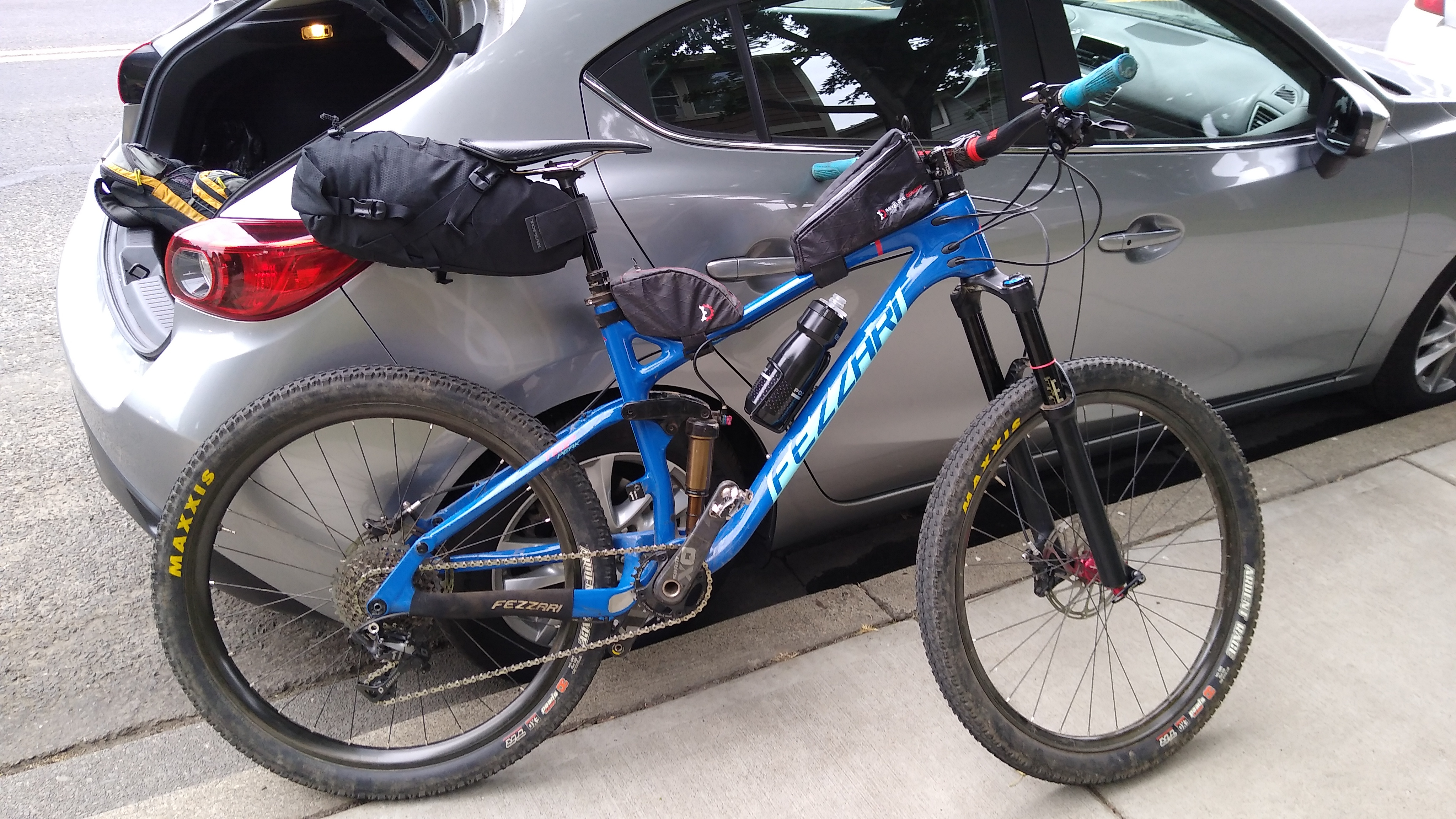
Have a bike that you trust, proven to stand abuse. A bike mechanical failure that strands you along the trail can keep you there overnight and become a life threatening situation. Make sure the entire drivetrain, axles, etc. are new and fresh. Several sections of the trail are too rugged for a gravel bike. You will need a true mountain bike, hard-tail or full suspension, with knobby or semi-knobby tires at least 2″ or 50mm wide. I used Maxxis Ardent Race, 2.2″ / 57mm and they were great. Anything narrower wouldn’t work, anything wider would make a hard ride even harder.

Clockwise or Counterclockwise?

This is a common question. Both ways are doable. Either way you go, you’ll descend into the canyon then climb back out again. These two points are Shafer on the NE side and Mineral Bottom on the NW side.

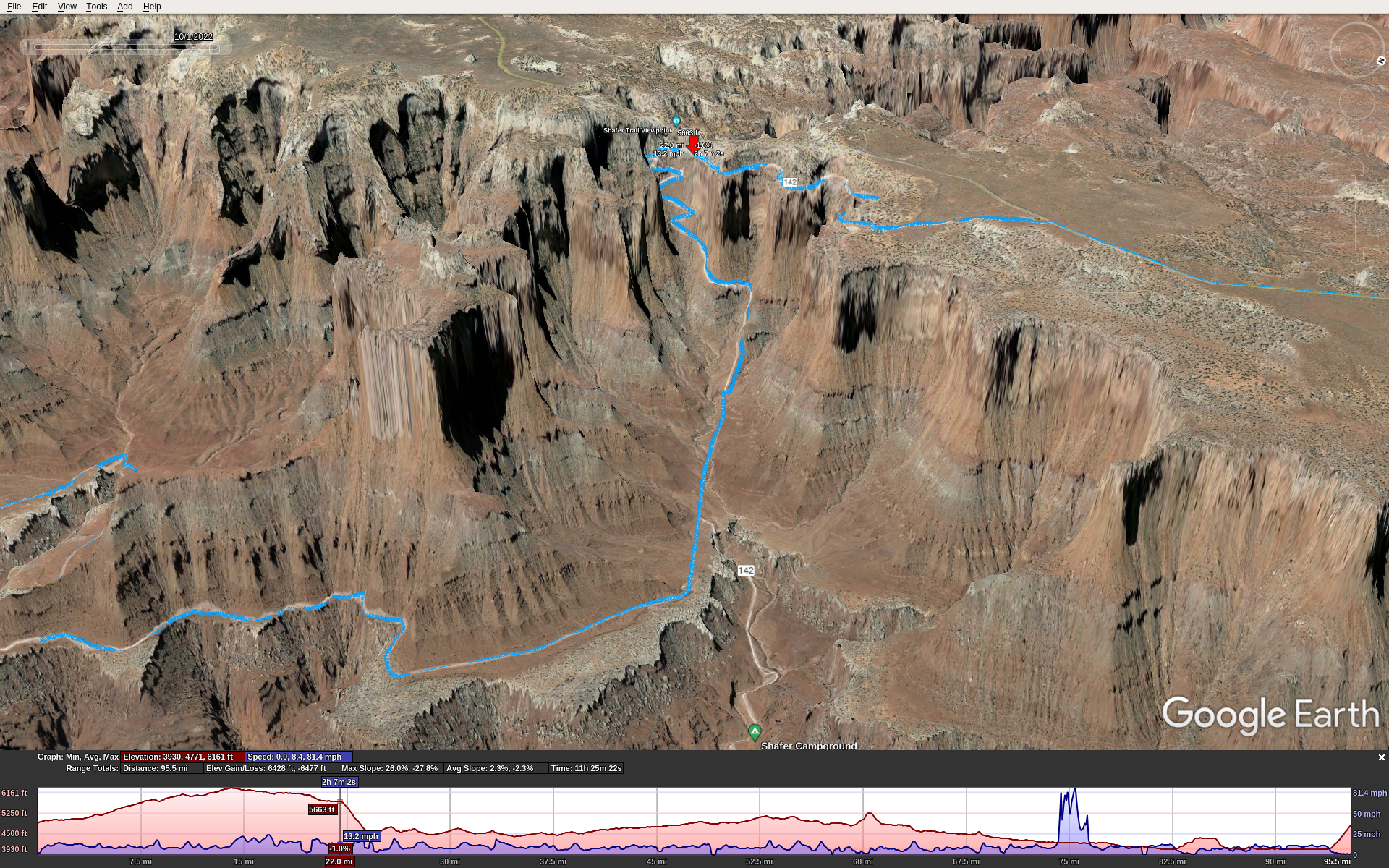
Here’s the Shafer grade. Red marker is poised at the top.

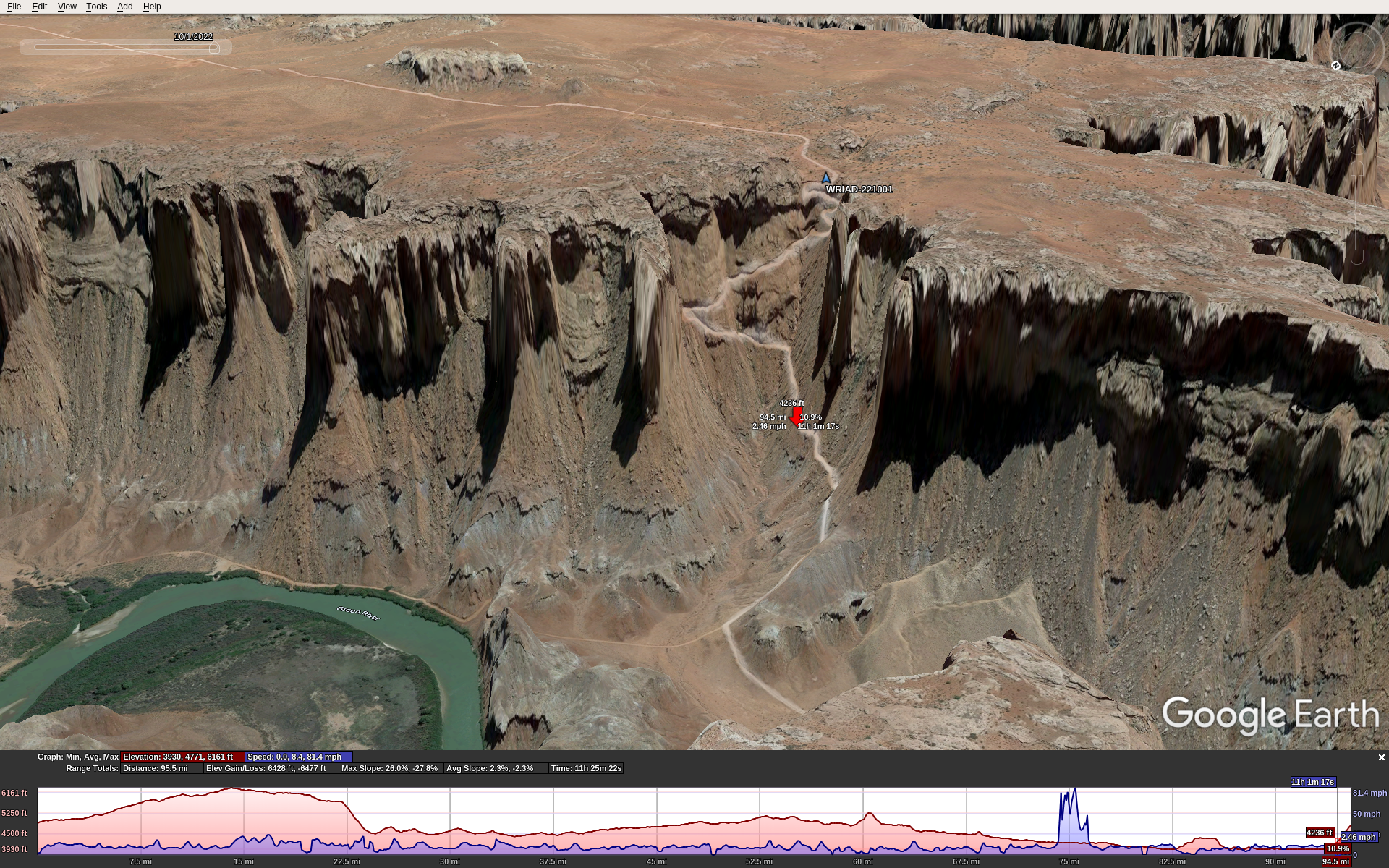
Here’s the Mineral Bottom grade. Red marker is half-way up, blue marker is our start/end point.

Also, along the trail in the canyon are 2 big notable climbs, each close to 1000′ with some sections too steep to ride. So no matter which way you go, you’ll have 3 very big climbs, in addition to the constant up and down of the trail.

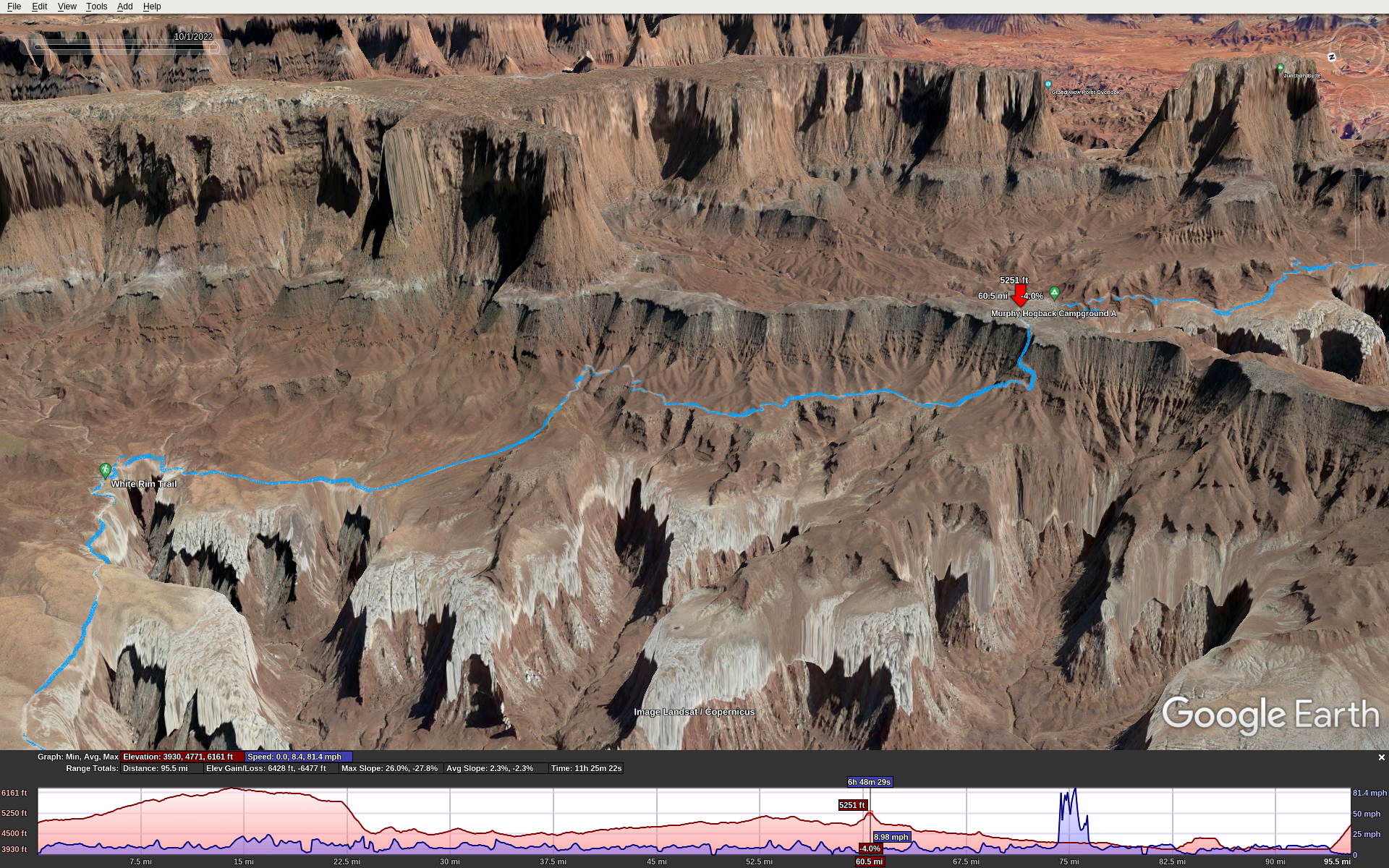
Climb 1, Murphy Hogback, the up side:

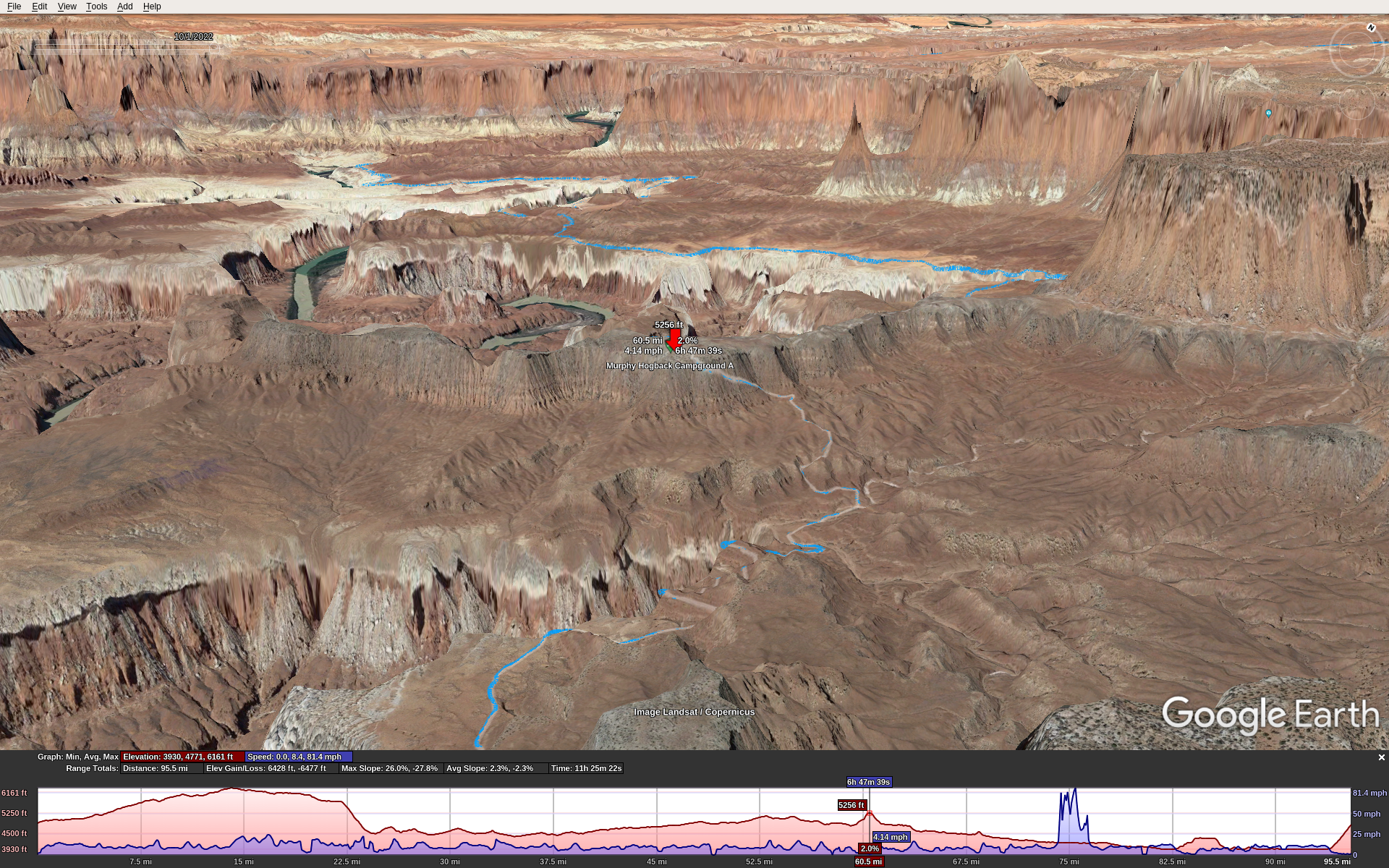
Climb 1, Murphy Hogback, the down side:

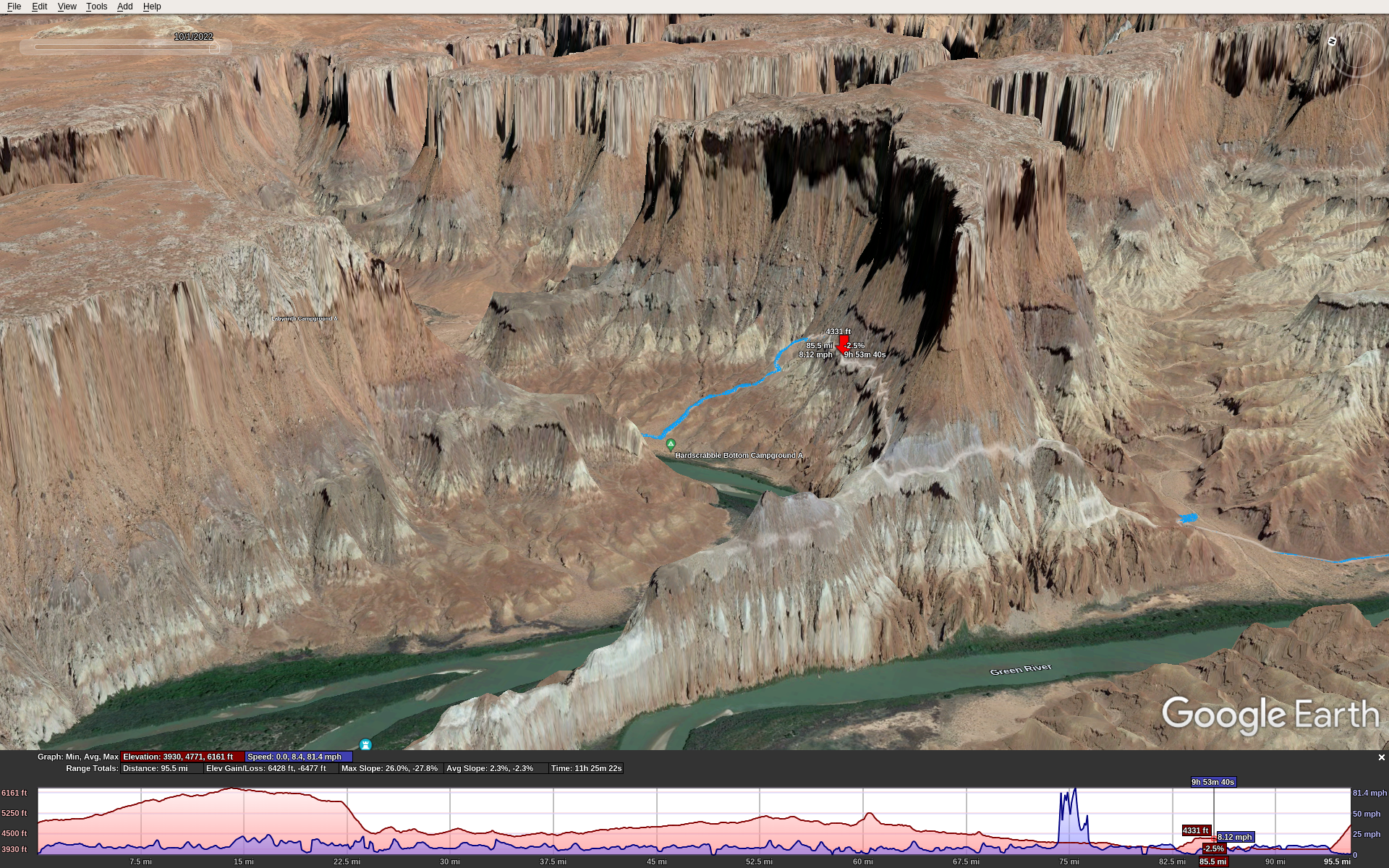
Climb 2, Hardscrabble Bottom, the up side:

Climb 2, Hardscrabble Bottom, the down side:

We went clockwise starting from the NW corner of the route: the parking lot and toilet just at the top of the Mineral Bottom Climb. This means starting with a 12 mile dirt/gravel road ride that gradually climbs about 1200′, then turning right onto the paved road that runs into the park. Total distance to the Shafer descent where you enter the canyon trail is about 20 miles. Then you ride another 79 miles along the White Rim Trail, and then climb up Mineral Bottom back to where you started. It’s about 1000′ in 1 mile.

The east half of the ride is easier than the west half. It’s just a bit flatter, less sand, less rugged & technical. So the drawback of the clockwise route is that the toughest riding is in the second half of the ride. However, the Mineral Bottom climb, as tough as it is, isn’t quite as rugged or long as the Shafer climb.

Getting There

I flew from Seattle into Moab in my C-172, Stefan drove from Boulder, and we met at the Moab airport KCNY. We stayed at the Moab Apache Inn. It’s not fancy, but it’s a good place with truly excellent service/management.

Sunrise was at 6:45, so that’s when we started. Temps in early Oct were in the mid-high 50s at the start and got into the 70s during the day. This was fortunate!

The Ride

Our start point was at 4800′ MSL. The way we rode, we started along the dirt/gravel road on a long gradual climb. This was nice because it was cool out and the climbing kept us warm so we didn’t need to bring jackets that we would only doff later and carry all day. At mile 12 we reached the paved road (Hwy 313) which is near the peak elevation of about 6000′. We turned S towards the park. After entering the park, a short distance more put us at the top of the Shafer grade with 20 miles on the odometer.

The Shafer descent is just rugged and steep enough to keep you on your toes. If you slide out and miss a turn it could lead to a fatal fall. It was no problem on my full suspension bike but you would not want a gravel bike or skinny tires. It’s incredibly scenic. A short distance and about 1000′ of descent later, you’re in the canyon on the trail. To call it scenic is a grave understatement. It’s stunning.

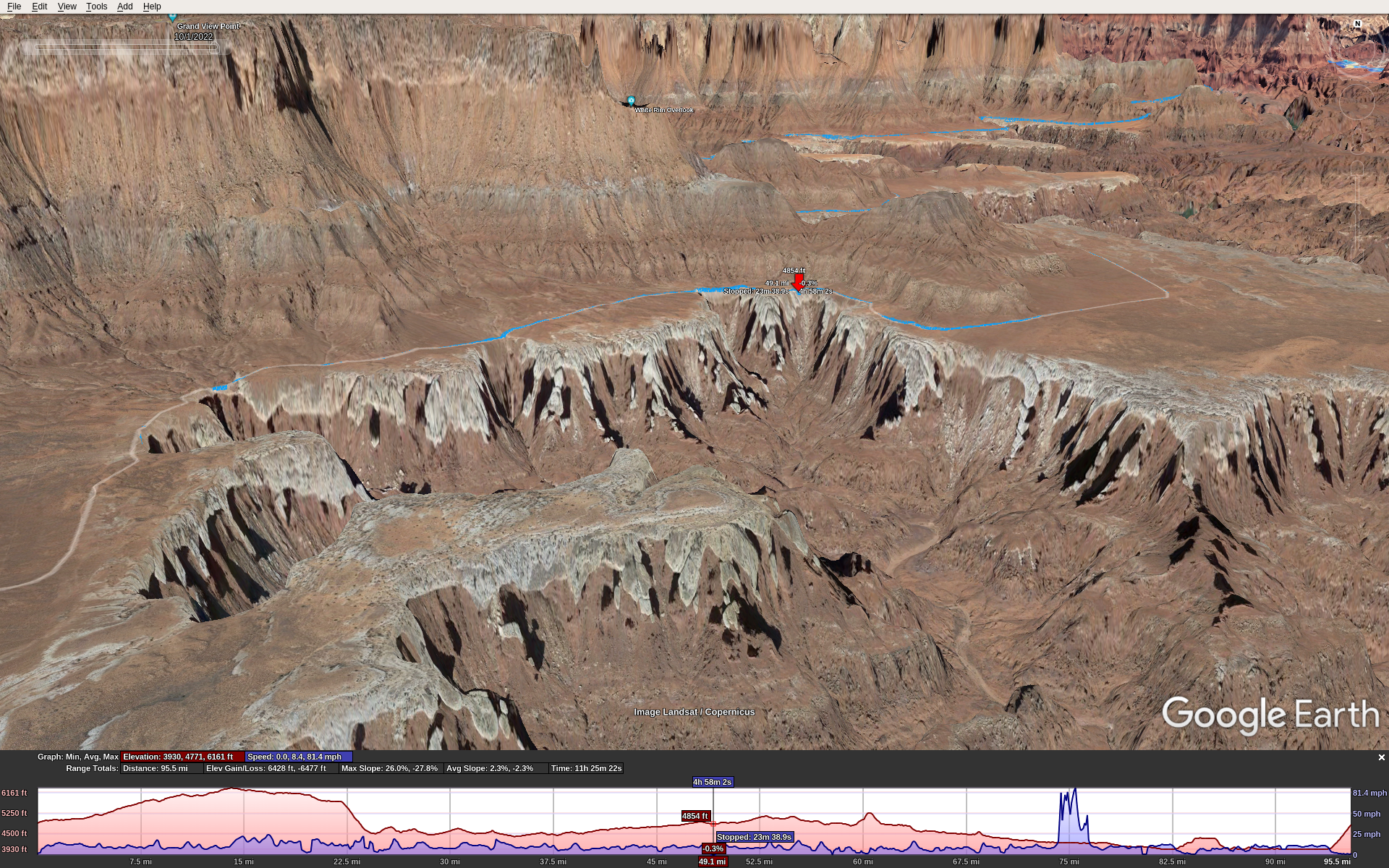
Here (red marker) is where we had lunch, around mile 55:

For the next 43 miles or so you ride along the rims of canyons, weaving in and around following the contours. Then you reach one of the big steep climbs at Murphy Hogback Canyon. Some parts of this are too steep to ride. It just goes up and up. The top levels off for less than a mile then you go down an equally steep opposite side.

The next 20 miles or so is a gradual downhill, but don’t let the word “downhill” fool you. It’s got long sections of soft sand which sucks down tires, forcing you to pedal hard at slow speed despite the downhill grade.

At this point I encountered nutrition difficulties. I brought Kind bars to eat throughout the day, because they are low sugar and worked great for me in all-day rides over the years. Yet starting around mile 65 I couldn’t keep them down; as I ate them I got a strong urge to barf them back up, so I had to stop eating them. Fortunately, Stefan had some spare Fritos and I had no problem eating those. I never considered chips to be an ultra-endurance food, but sometimes during adversity we learn new things about ourselves. In hindsight it makes sense: Fritos are simple carbs (but no sugar), plenty of salt, and calorie dense. I don’t think the problem was electrolyte loss because I had Nuun mineral tablets in all my water.

Then you reach the second big climb, Hardscrabble Bottom. It’s every bit as tough as the Murphy Hogback climb, ultra steep with some sections too steep to ride. Ride along the top for about 2 miles or so, rolling up and down varying from decent to rough technical conditions. Then back down the other side takes you to around 4000′ MSL about the level of the Green River.

Now ride along a decent quality trail following the Green river for about 15 miles or so, mostly flat. Then around mile 99 you reach the right turn to go up Mineral Bottom. Only 1 mile to go, but it’s very steep, nearly 1000′ climb.

At the end of the ride I didn’t feel right – eating or drinking would have triggered vomiting. I think it was temporary over-exertion because over the 1st post-ride hour I slowly sipped 12 oz of water and kept it down, and over the next hour I felt fine. An hour later we ate a big dinner in town, no problem.

Conclusion

WRIAD was a bucket-list ride for me. The preparation and execution consumed nearly a year of my life. I got into the best physical condition I’ve ever been, similar to doing La Ruta over 20 years ago. Even so, it was one of the toughest rides I’ve ever done, if not the very toughest. I’m pretty sure I’ll never do it again, but big rides like this come with satisfaction and confidence equal to what you put into them. Thanks Stefan for suggesting this one! It was an epic adventure.

Subaru Timing Belt Change

Back in Aug 2020 I resurrected our old Subaru Forester by replacing the timing belt and other 100k mile service items. Fortunately, the head gaskets were in decent shape so I hope it will go at least another 100k miles trouble-free.

I took some photos as I went: http://mclements.net/SubieWork-200829

Afterwards, it took some miles for it to relearn its idle, I had to top off the coolant a few more times and replace the spark plug wires. The ladies took it on a cross-country road trip to New York, so I put new tires on it as well. The car was flawless on the long trip and it’s been running great ever since.

John Wayne / Palouse Trail, Columbia River, Beverly Bridge

For years I’ve thought about riding this trail from Seattle to Idaho. This presents 2 challenges. First, how to cross the Columbia River? The bike/walk bridge south of the I-90 bridge was condemned and closed, and there is no other way to cross the river on foot or bike. Second, it’s over 300 miles which means multiple days of planning, logistics to get back home, and availability of hotels/motels east of Othello is virtually non-existent, and camping would mean carrying a bunch of extra gear.

The WA state Dept. of Transportation solved the first challenge. They rebuilt the Beverly bridge and it re-opened earlier this year. This put the trip entirely into my own hands.

Planning: A Short Route

A short route of only 1-4 days out and back seemed the simplest approach. I planned trip legs from Seattle to Idaho, each day covering 60-80 miles. Since there is no lodging available east of Othello, that would be the eastern-most point for my short route.

Ellensburg to the Columbia River / Beverly bridge along the JWT is about 35 miles. And it’s another 38 miles to Othello. This gives 2 equal distance options:

1-day: Ellensburg to Beverly and back (70 miles). Just cross the river and return.

2-day: Ellensburg to Othello, stay overnight in Othello, then return the next day. 73 miles each day for 146 total.

I opted for the 2-day trip.

This would require overnight parking in Ellensburg. I discovered CWU has a free all-night parking lot at 18th & Alder. For lodging, I recommend the Othello Inn & Suites. Not fancy, but as I was soon to discover, they have very good service. East of Beverly the JWT requires a permit that I got here: https://www.parks.wa.gov/521/Palouse-to-Cascades. It’s free and you’re supposed to carry a hardcopy with you.

Due to unknown trail conditions, I figured on averaging 11 mph which would make 6.5 – 7 hours of cycling. I brought 124 oz. of water with Nuun tablets (all electrolyte, no sugar or calories). This consisted of my 100 oz. Camelbak bladder with a 24 oz. water bottle. For food, I aim for about 240 calories / hour. I had 18 energy bars (Kind bars with only 5 grams of sugar each), which should be enough for both days.

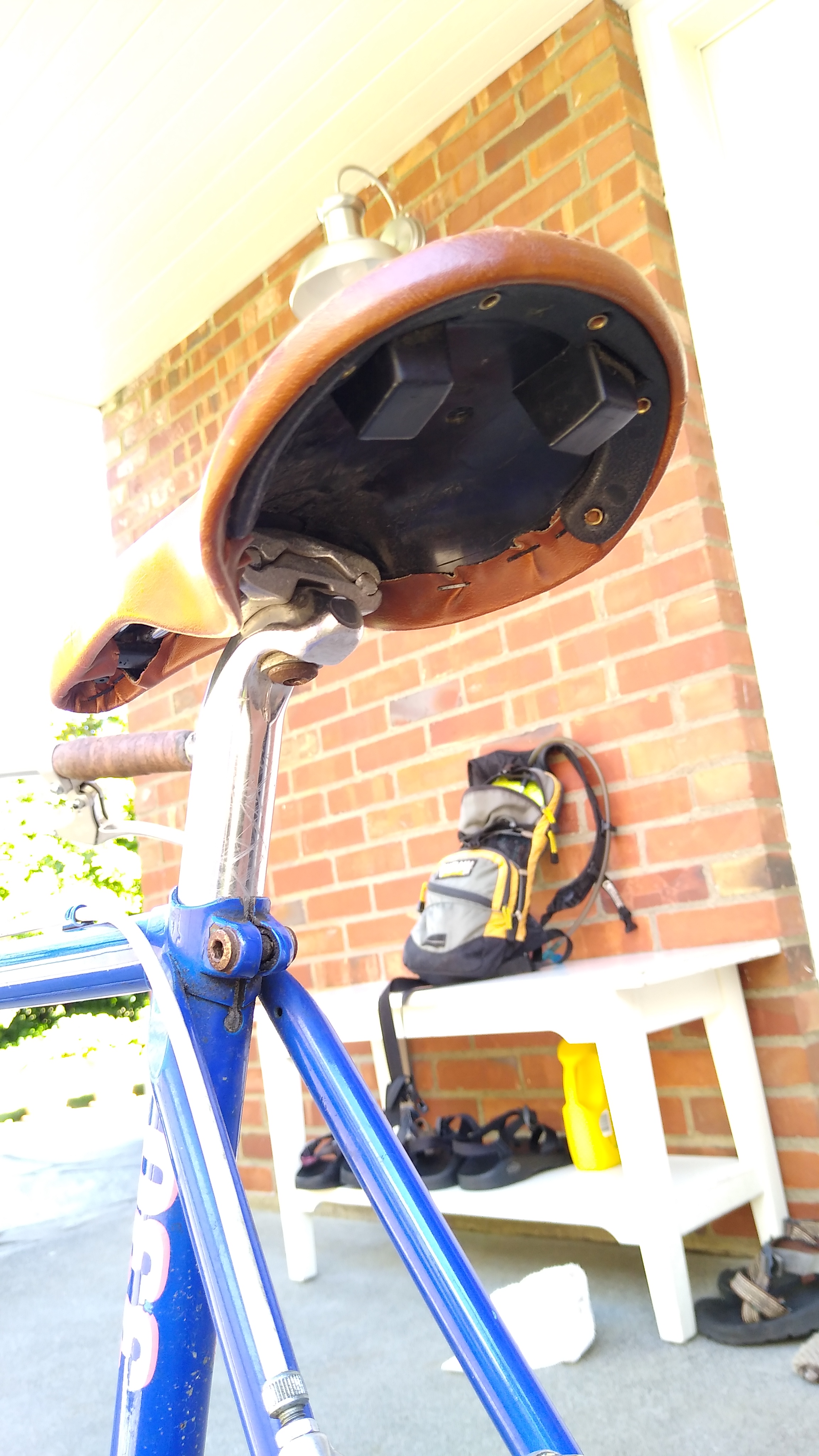
I also had fresh cycling clothes for day 2, street clothes, sandals, toiletries and a charger in my under-seat bag. And in my Camelbak I keep tools for just about everything that can break on the trail: spare tube (even though my bike is tubeless), pump, oil, multi-tool, derailleur hangar, and more.

The Start

It’s about a 2 hour drive from Seattle to Ellensburg along I-90. Upon arriving, I could not park at the CWU lot. It was inaccessible due to a bunch of street closures, due to a labor day weekend parade going through town. I found street parking nearby, which was not posted “no parking”, let along “tow-away”. Ellensburg is a small sparse town and parking is not hard to find.

I rode across town to find the JWT trailhead at the S end of Alder street. After waiting for a long line of parade horses to cross, I started pedaling E along the trail.

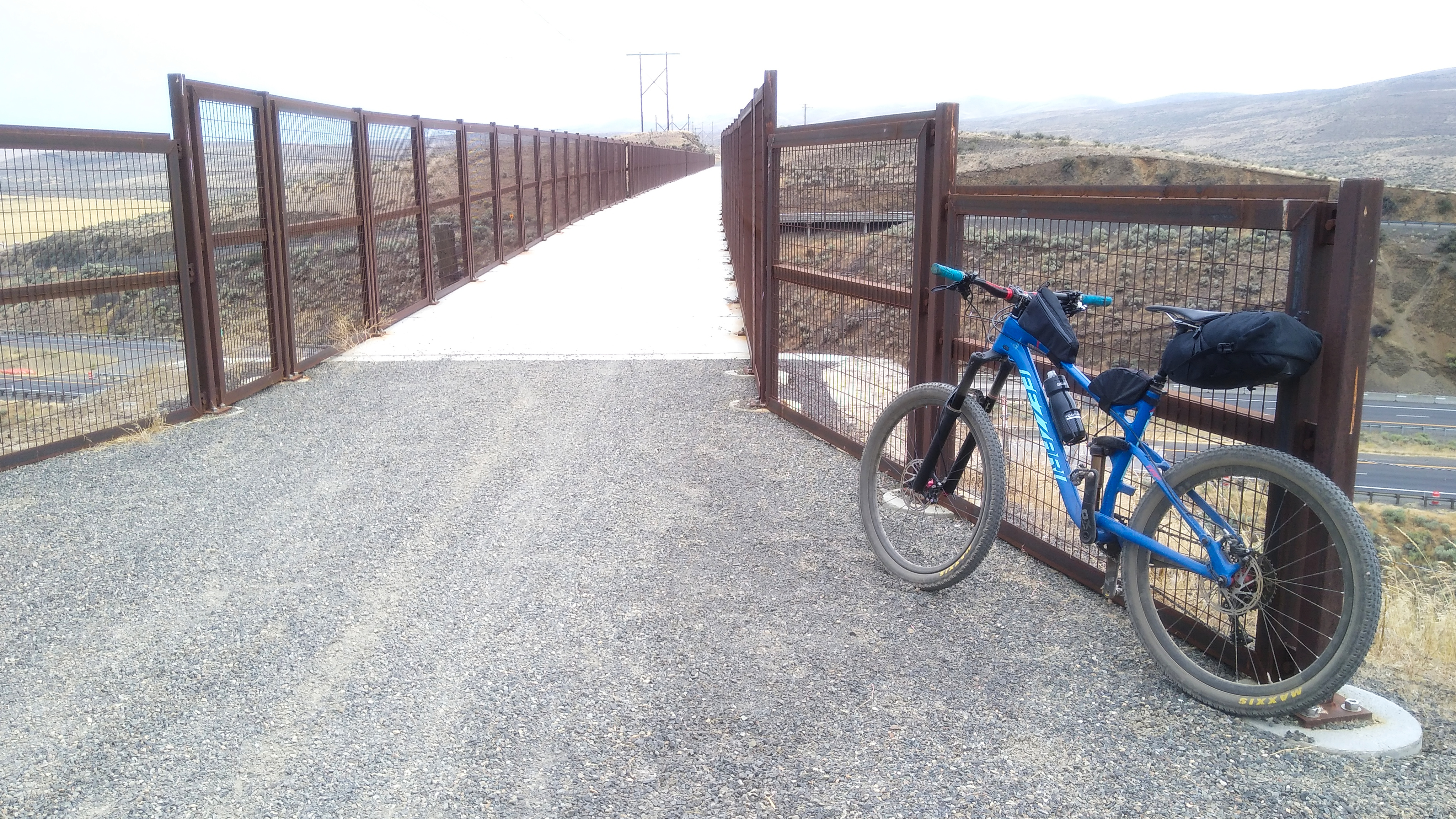
The bike, ready to go:

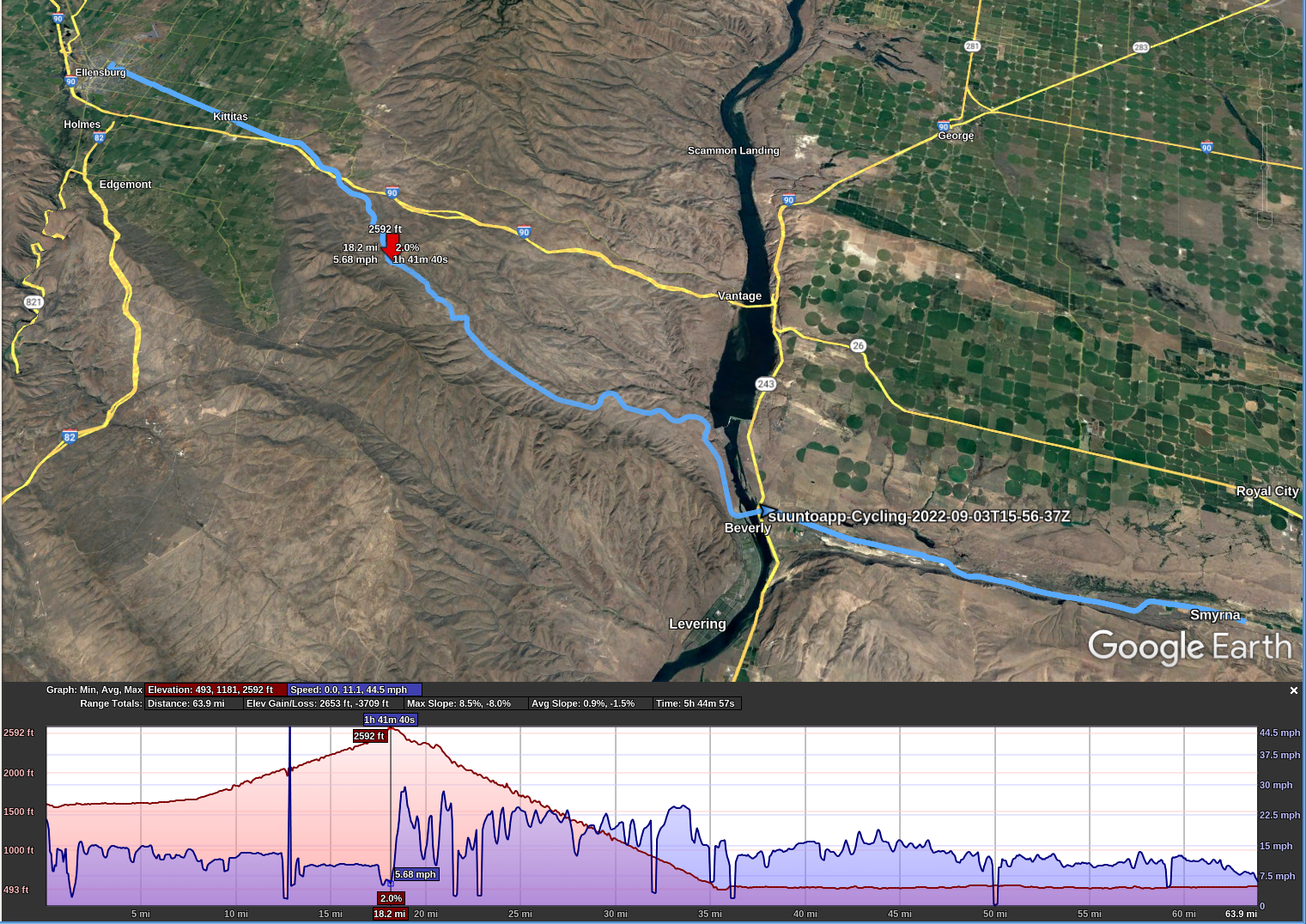
The JWT in Ellensburg is about 1600′ elevation. The first 8 miles or so is pretty flat. Then it starts a gentle, gradual climb to 2600′ about mile 18.

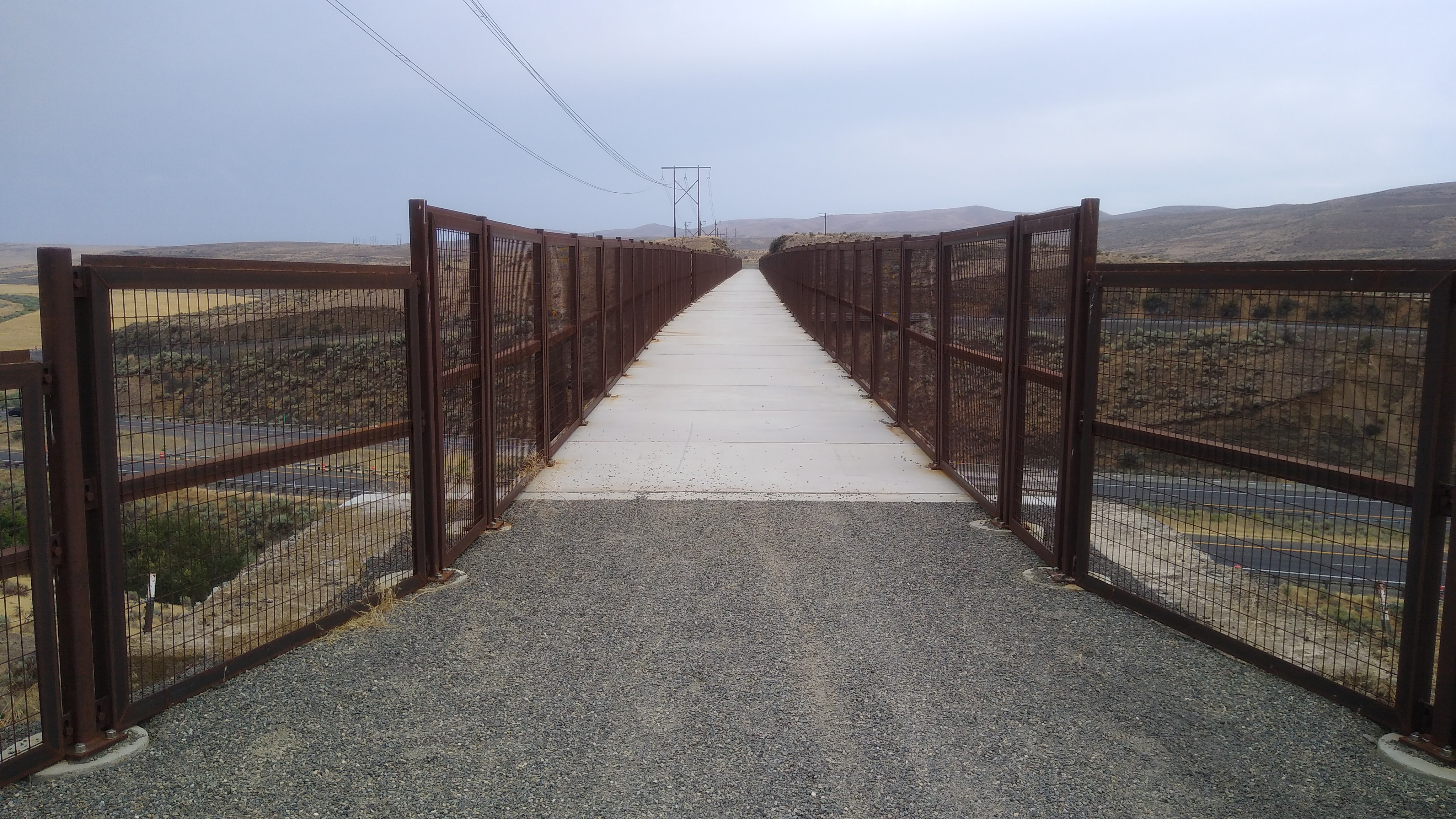
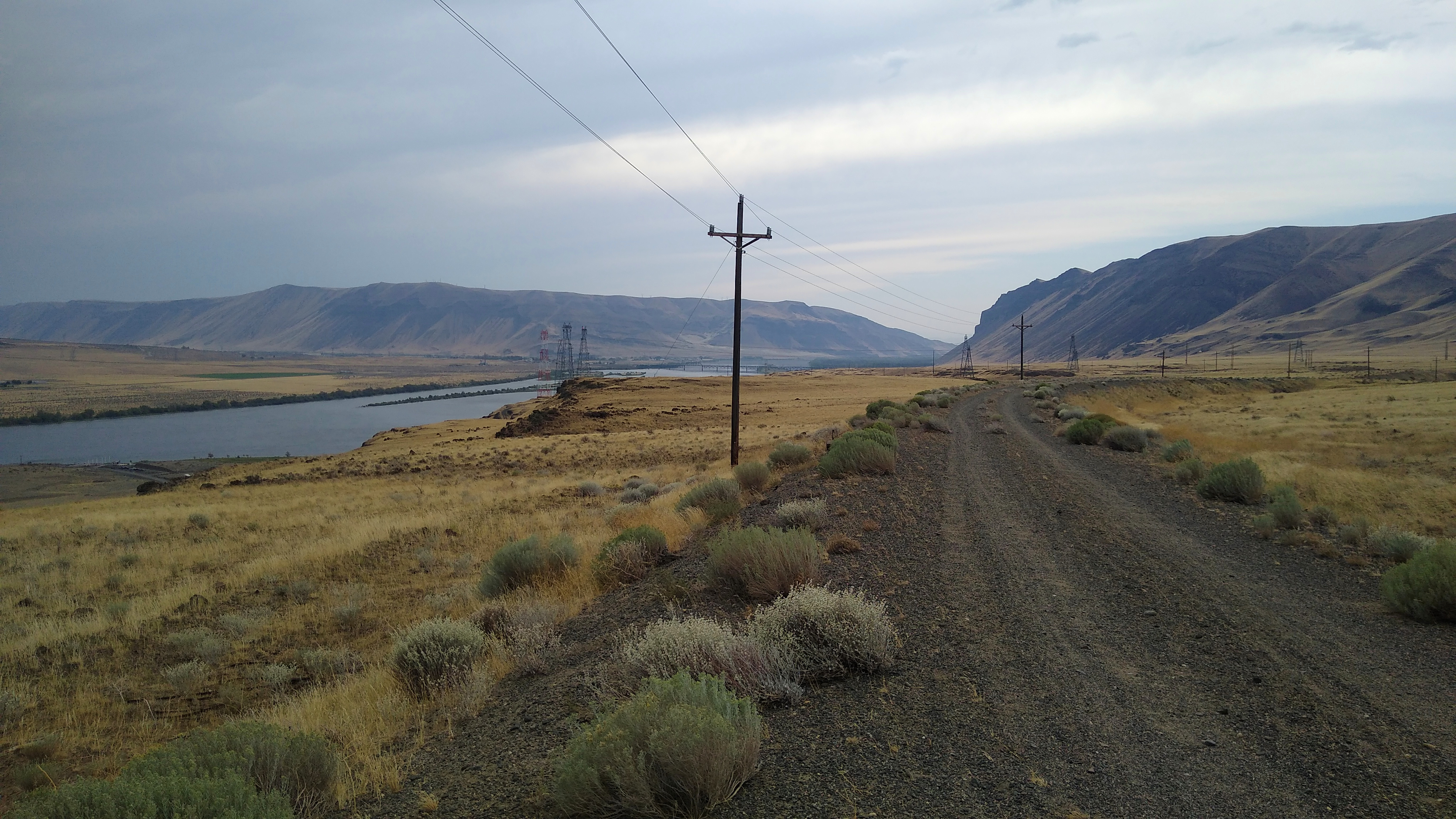
The JWT passed through a few houses and ranches, then got more remote. About 1 hour into the ride is a bridge crossing the freeway:

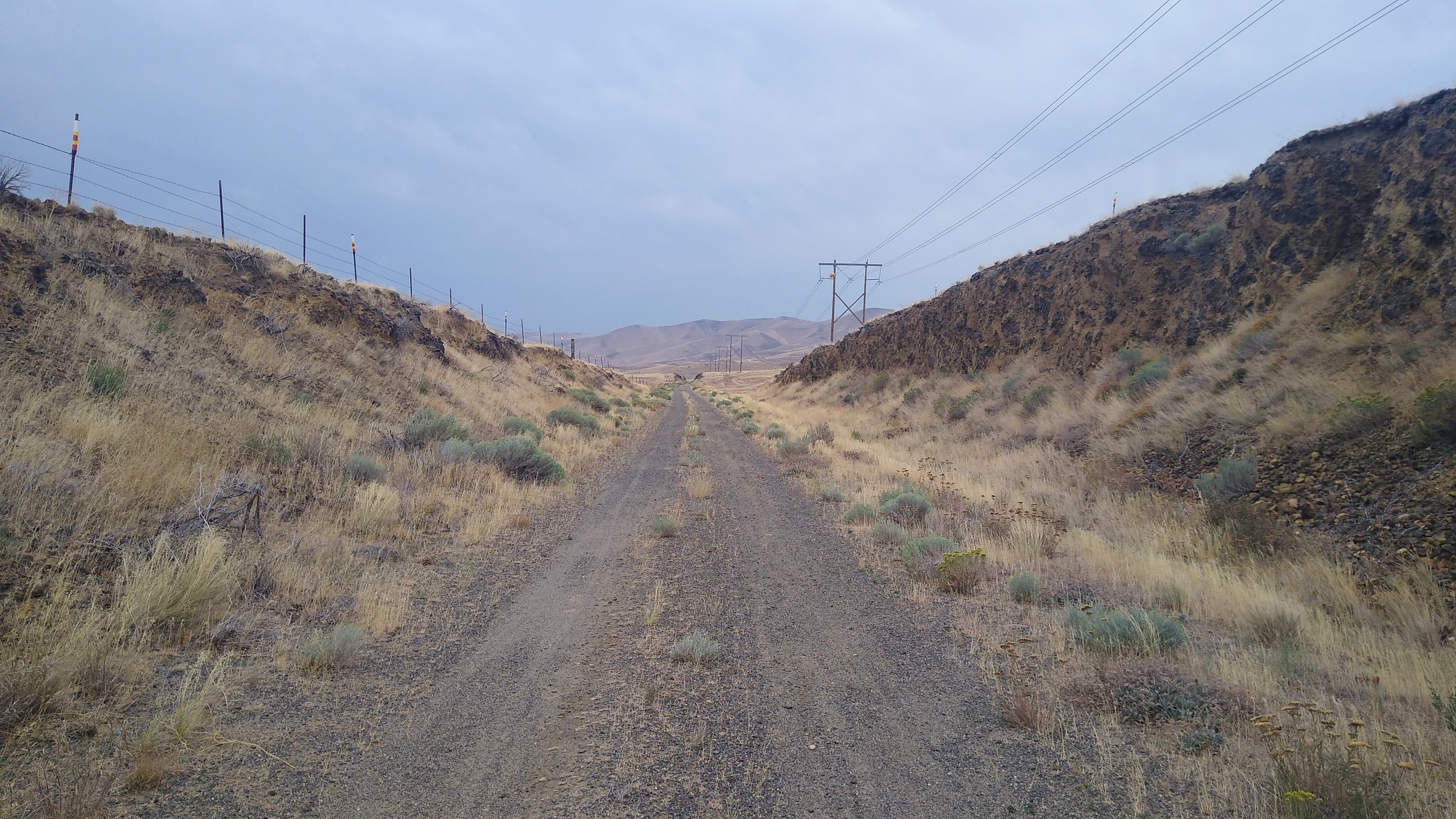
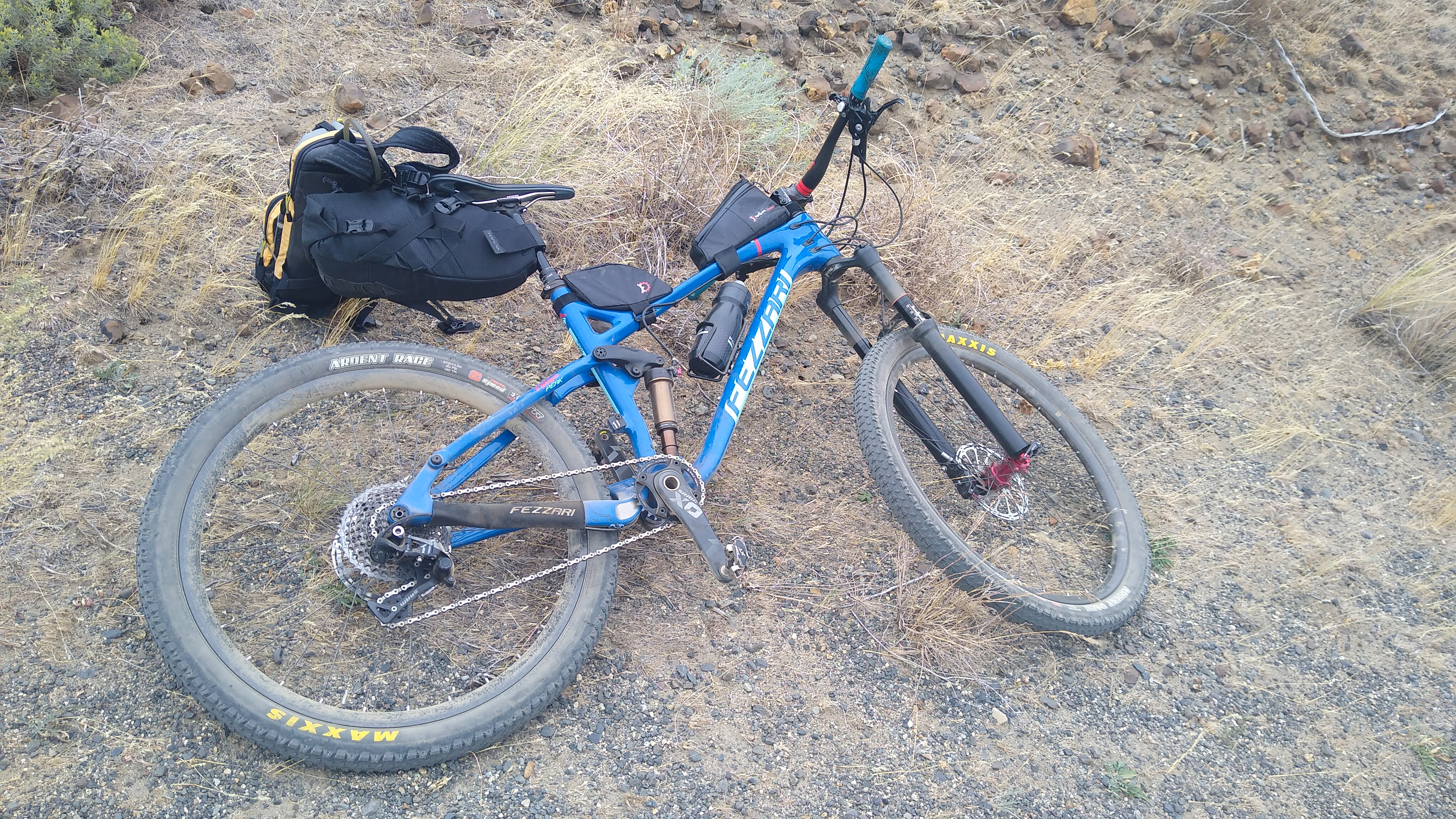
The trail surface varied between gravel and dirt, mostly hard packed and fast, with a few sections that were softer (sand or loose gravel) and slower, harder effort to overcome the tires sinking into the surface. I recommend having at least 45 mm wide tires, wider is better. My tires are Maxxis Ardent Race 27.5×2.2 or 584-56. They slid and sank a bit, but were manageable. I wouldn’t want anything narrower.

About 1 hour later I stopped for another bite and took a few more photos.

The trail:

The bike:

The rider:

Columbia River / Beverly Bridge

Leaving Ellensburg, the JWT climbs from 1600′ to a peak of 2600′ at about mile 18. From mile 18 to mile 35, where you reach the Columbia River, it gradually descends to about 500′. That’s a 17 mile gradual descent, very fun going East, especially since prevailing winds are from the West, and today was very windy, 20-30 mph. When the trail turned N or S, the wind gusts would exceed my tire traction and start blowing me across the road! But it was mostly a tailwind.

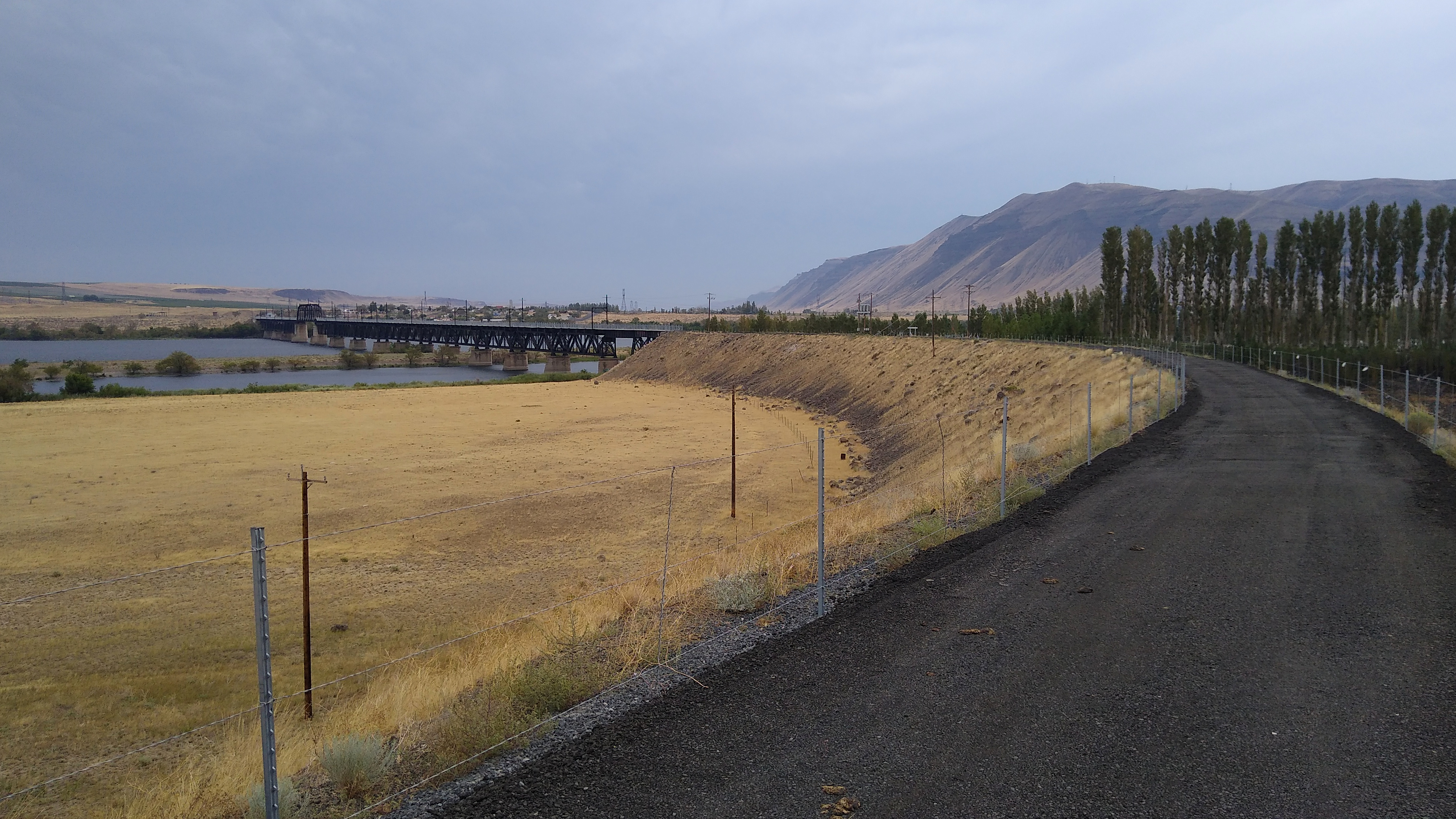
30 minutes later, or about 2.5 hours into the ride, I got my first glimpse of the Beverly bridge in the distance:

Still feeling great!

The bridge closer up, ready to cross:

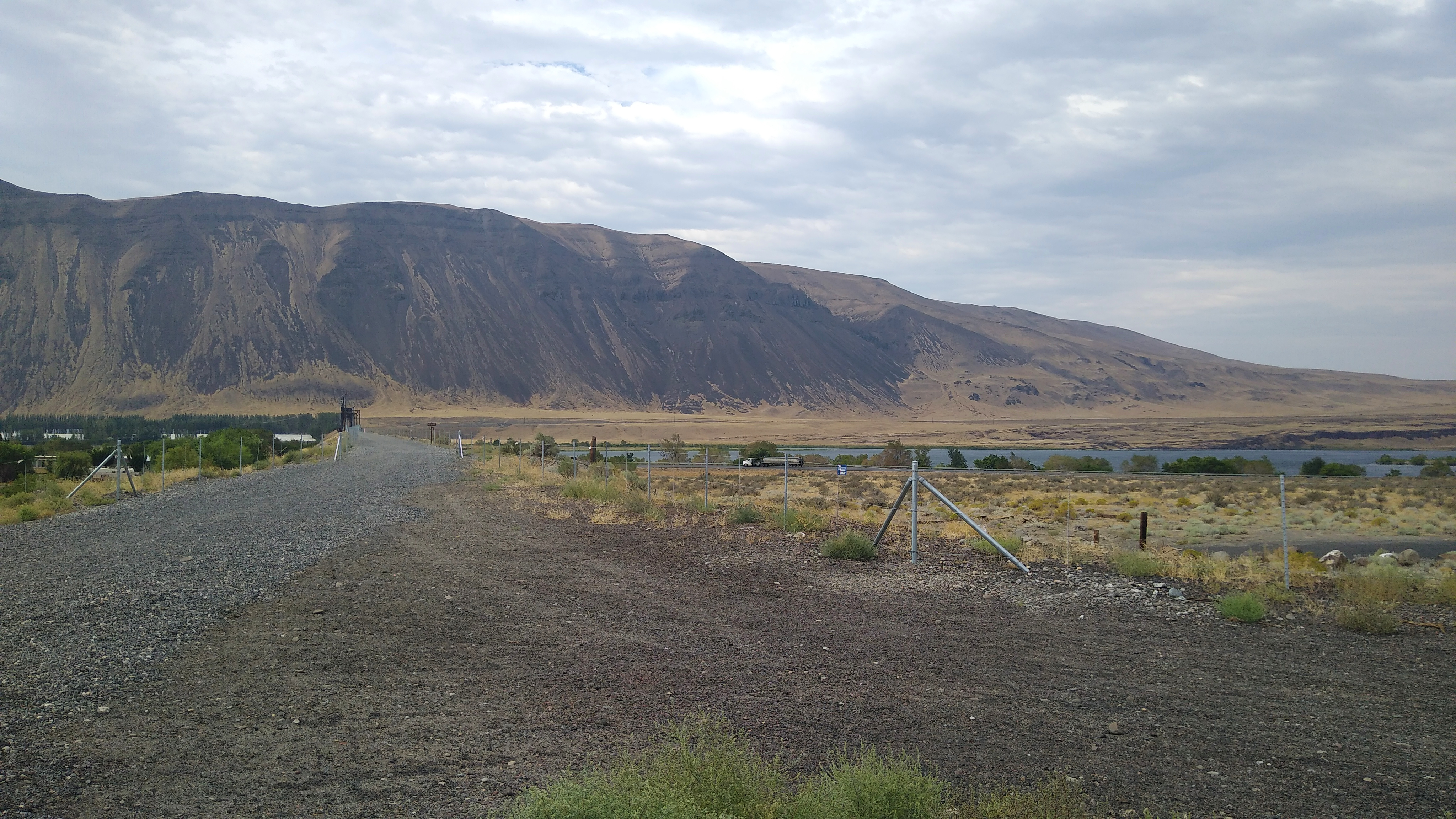
It’s about 1/2 mile across and the wind just rips down the river, so one is riding in a straight line while leaned over. Looking back after crossing:

Beverly is not much of a town. No motels, no stores. Just a few residents who drive to nearby towns for any services.

My Bike Breaks (again)!

I continued East for another 15 miles. Then, upon reaching mile 50, my pedals suddenly felt like they hit something. I backpedaled a bit then they worked again. I figured a small rock jumped up into the chain and hit the derailleur. But then the derailleur wasn’t shifting right either. I stopped to check it out.

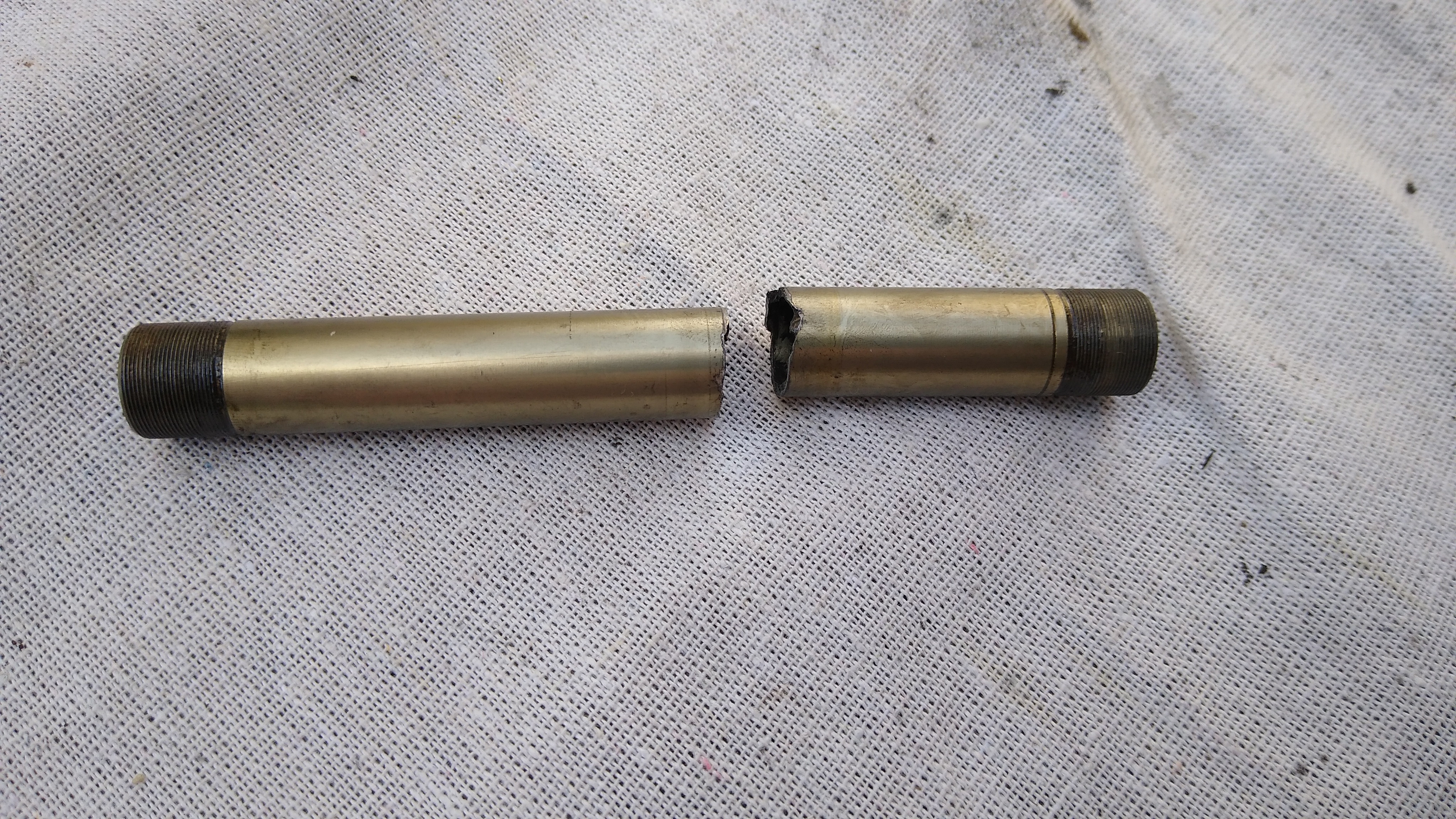
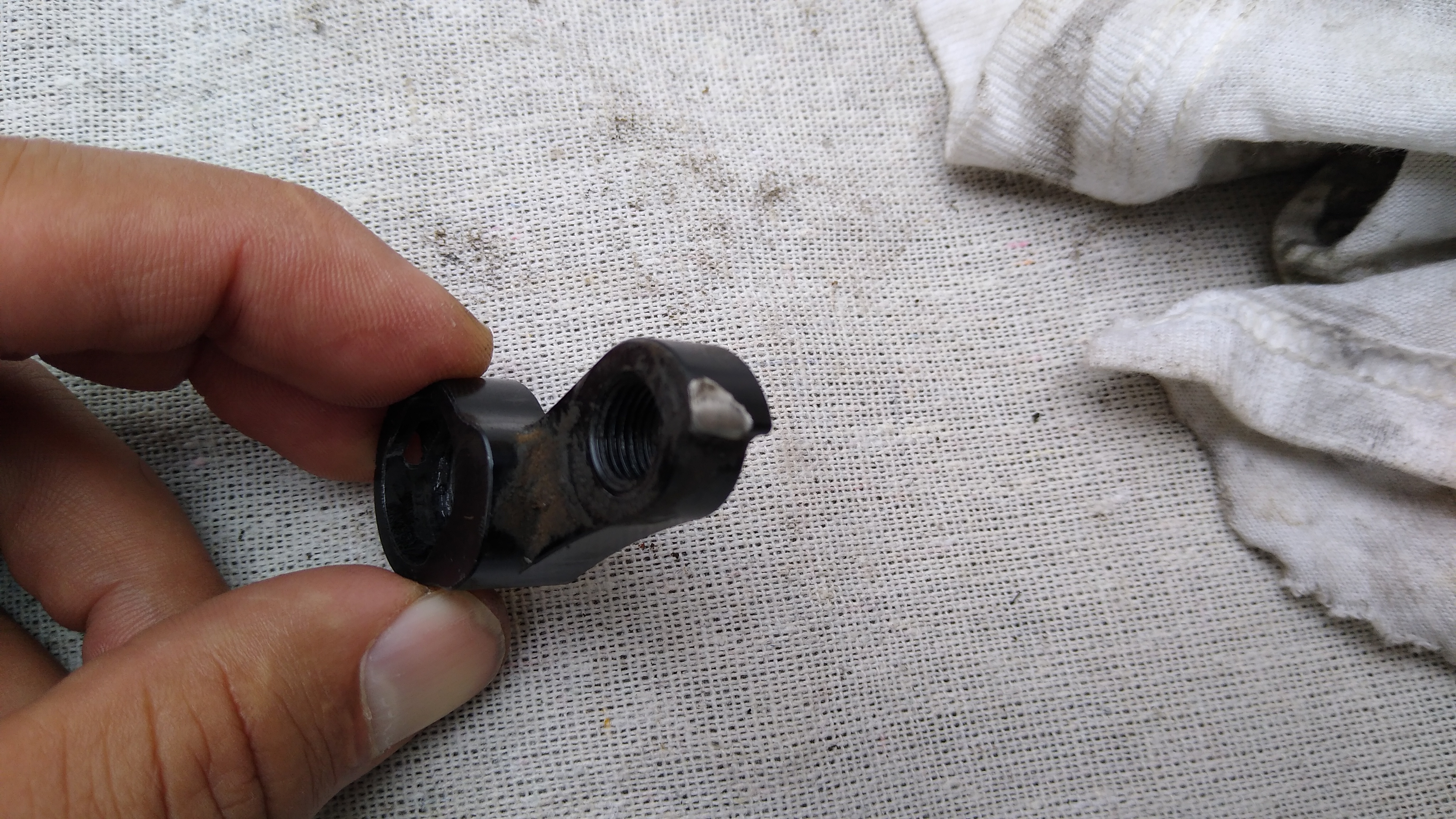
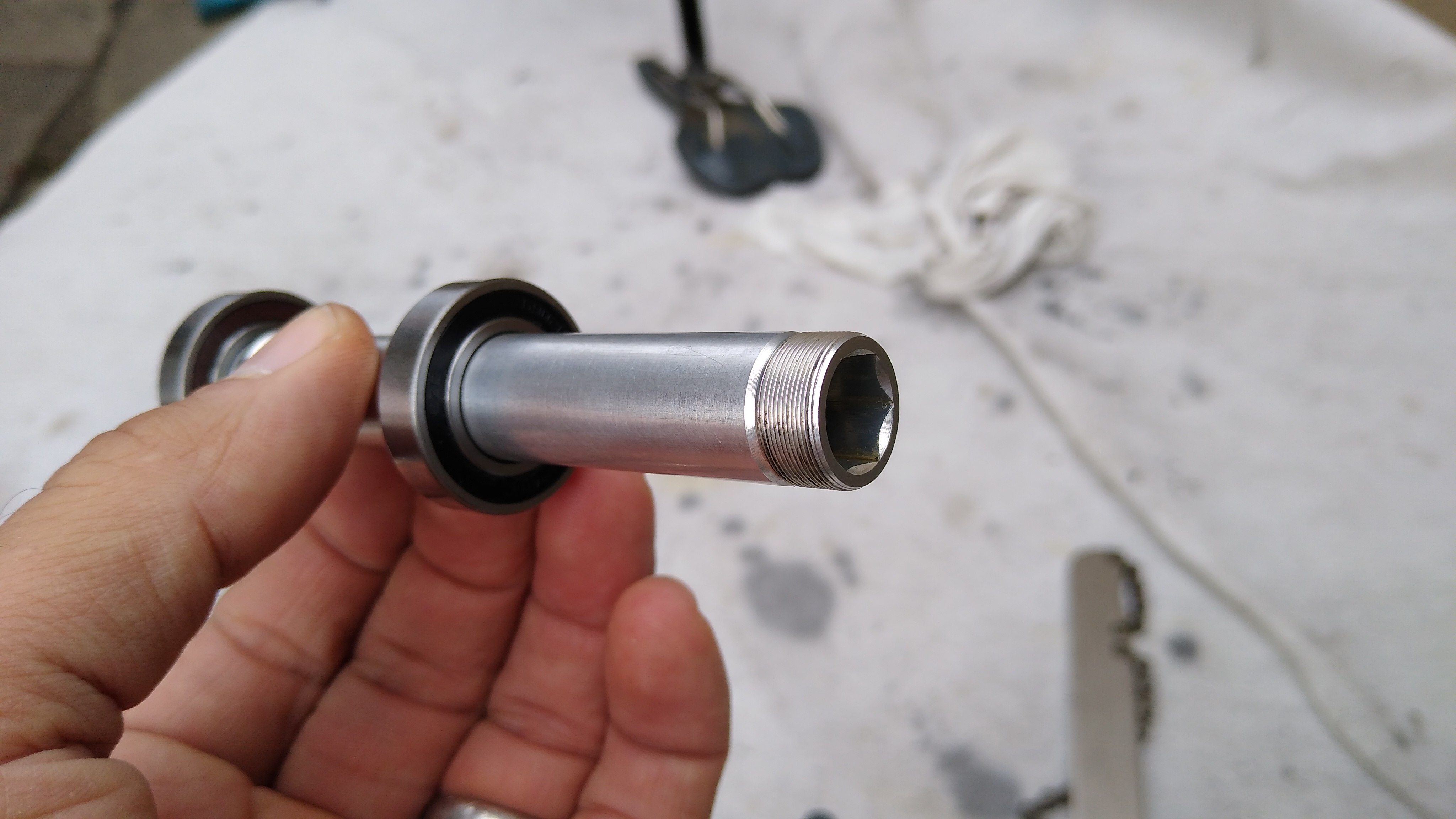
Long story short: the bike’s rear axle snapped in half! It has a through-axle, and the hub axle (12mm inner diameter) snapped in half, while the quick release (12mm outer diameter) that goes through it was still in 1 piece. The derailleur hanger’s end stop was also sheared off, so the derailleur was trying to swing forward. I had a replacement hanger in my bag, but I couldn’t install it because the inner bolt that secures the derailleur to the hanger, which looked like an allen, was actually a torx, which I didn’t have. I was able to jerry-rig it in place with the “b” screw. I was also able to line up the broken halves of the axle and reassemble the wheel with the quick release holding it all together. The wheel spun properly with no play, the freewheel worked, it was rideable. Of course, the broken axle put the quick release shaft under greater stress, and with both the axle & derailleur MacGyvered, I knew it wouldn’t be many miles before one of them broke permanently. At that point I would be walking.

Othello is a real town with some services, but it was 25 miles ahead. Beverly has nothing, but it is only 15 miles back. I opted to go back. That was one of the longest 15 miles I’ve ridden: into a 20-30 mph headwind, on soft dirt/gravel, anticipating the sudden snap of the quick release or derailleur breaking, at which point I would be walking.

Along the way back, I finished the 100 oz of water in the Camelbak and switched to my water bottle. I arrived in Beverly around 2:45pm. At least my phone worked (thank you T-Mobile!). First I rode by the fire dept. but nobody was there. Then I stopped by the residence of some locals and asked them about services. No Uber, no Lyft, nearest taxi service is in Pullman. I called Othello to cancel my room, told them what happened. Due to my circumstances, they waived the cancellation fee. I called my wife in Seattle and she agreed to drive all the way out there to pick me up, as a plan B if I couldn’t wrangle a ride from locals. At the residence, the dad (Reynaldo) who only spoke Spanish gave me some water and his son (Jerry) was talking to me about my bike. It looked like they were just relaxing for the afternoon, not too busy, and he had a small pickup truck, so I asked the dad if I could pay him to drive me to Ellensburg. He said sure, as long as I paid for the gas. I told him thanks, and also I’d pay him $100 too for his trouble. So Reynaldo, Jerry and I drove back to Ellensburg and they dropped me off at my car.

So that’s why I rode only 65 miles instead of 146 this weekend. And got stranded by my bike breaking in yet another new way.

The Aftermath

The route, with elevation profile. The red marker is the peak elevation (2600′).

The broken axle

The sheared derailleur hanger

The new axle that Reynolds shipped me a year or two ago (it came with the pawls I had to replace), which doesn’t fit because it’s made for traditional quick-release not through-axle.

Corda COUNTry: All in One Audio

Summary

The Meier Audio Corda COUNTry is a unique little device:

  • Equalizer, headphone crossfeed, reverb and other audio functions implemented in DSP (Digital Signal Processing)
  • Inputs (digital only): USB, SPDIF coax and toslink
  • Digital outputs: SPDIF coax and toslink
  • D to A converter
  • Analog output: single ended RCA (line level, volume controlled)
  • Analog output: single ended 1/4″ headphone jack

Its purpose is to adjust or tailor the sound to listener preferences. You can use it in many ways, though they fall into 3 categories:

  1. Pure DSP upstream from your DAC
  2. Headphone amp
  3. Preamp

In the first case you already have a headphone amp or preamp and you only want the DSP features. In cases (2) and (3) the COUNTry is an all-in-one device. The COUNTry was originally designed for (1) without any D/A or analog outputs. Later, the D/A and analog outputs were added since they increase flexibility with minimal cost impact.

The COUNTry operates internally at a single fixed sample rate: either 96k or 192k (buyer’s option). Digital inputs are resampled (if necessary) to this rate. I received a 192k unit.

The COUNtry
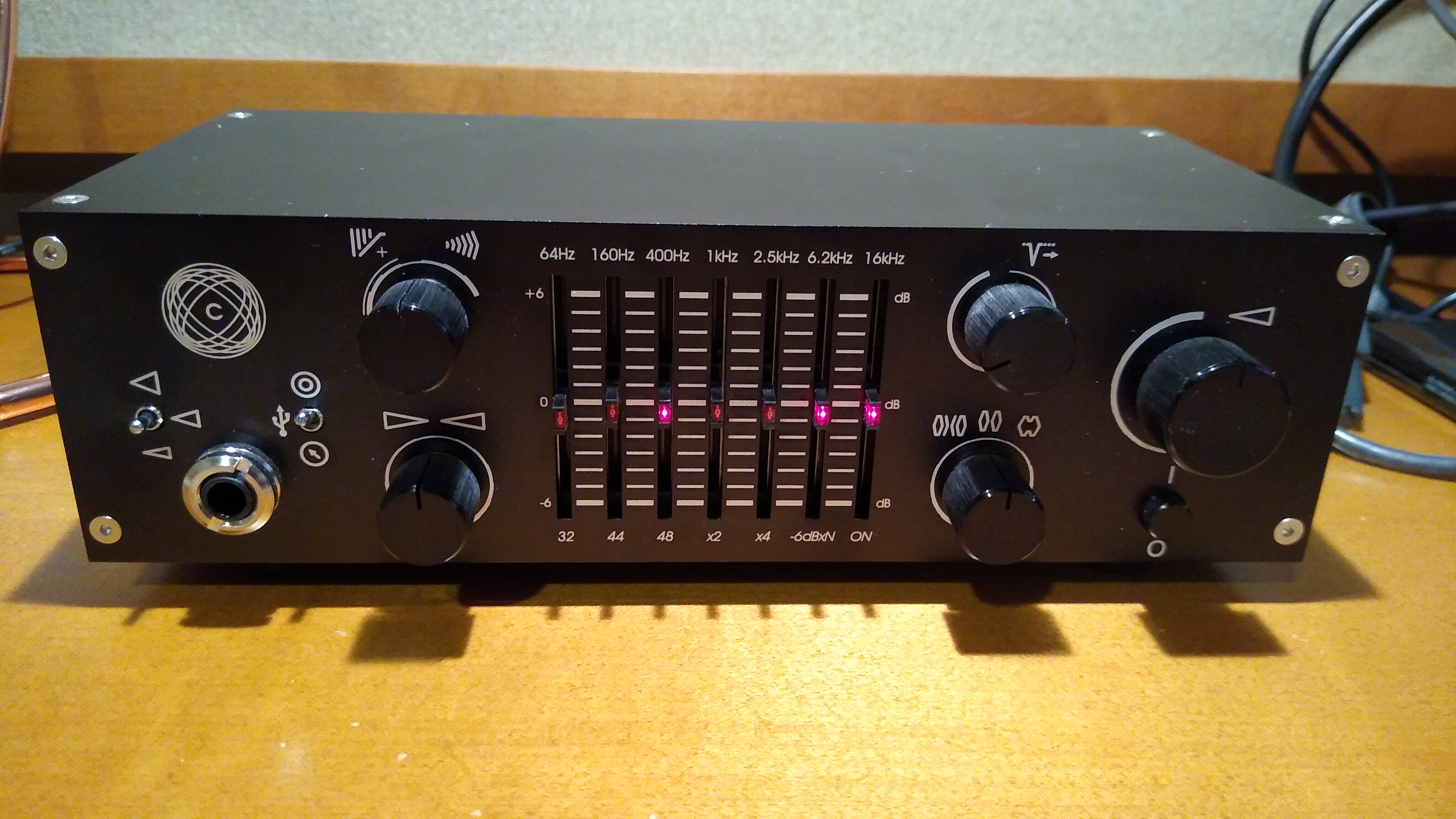
As auditioned, tested, measured
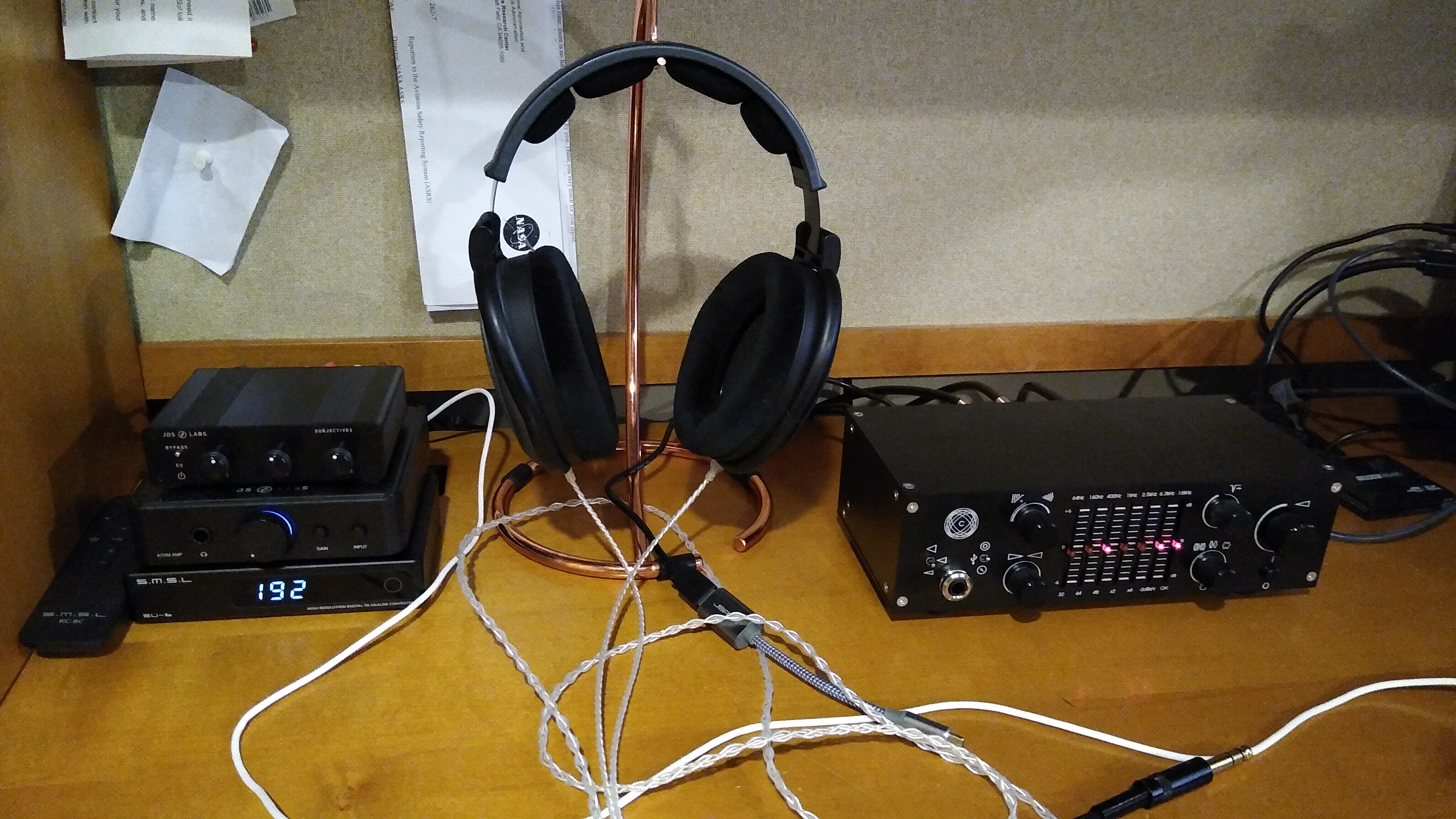
Features

I’ll review the features in the order in which I might use them most myself. With some of the features, like crossfeed and reverb, I couldn’t imagine a way to measure them. However, I did use and listen to all the features, and found that each does what it says and the effect is easily audible.

Measurements

I measured the COUNTry using a PC running Ubuntu 18, an ESI Juli@ sound card, with Room EQ Wizard software. I also have an SMSL SU-6 DAC and a JDS Atom amp. The Juli@ SPDIF coax output went directly to the COUNTry. I measured it in 2 ways:

  • COUNTry analog line level outputs to Juli@ analog inputs
  • COUNTry digital SPDIF coax output to SMSL SU-6 DAC, to Juli@ analog inputs

This measured the COUNTry as an all-in-one device with D/A conversion and analog output, and also as a DSP-only device upstream from a separate DAC.

The Juli@ sound card is high quality, but it’s nothing like professional measurement equipment from manufacturers like Audio Precision. I can measure the basics (frequency response and distortion), but take the measurements that follow as directional guidance within the limitations of my equipment.

Equalizer

The equalizer’s 7 bands have equal octave spacing with frequency ratio of 2.5:1 or 1.32 octaves. They are symmetric and complementary, so they can be combined without ripple. A picture’s worth 1000 words, so here are frequency response graphs of the positive and negative ranges respectively, showing each control individually, and all combinations.
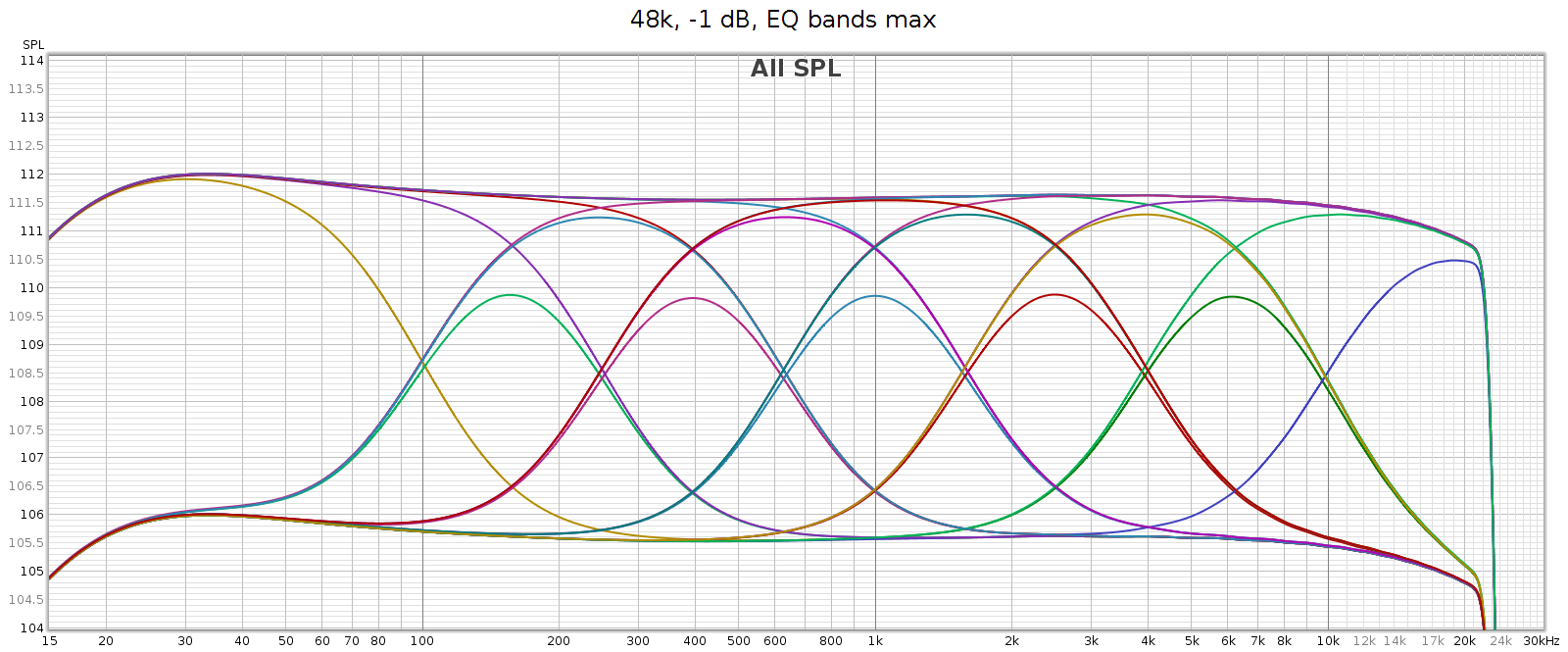
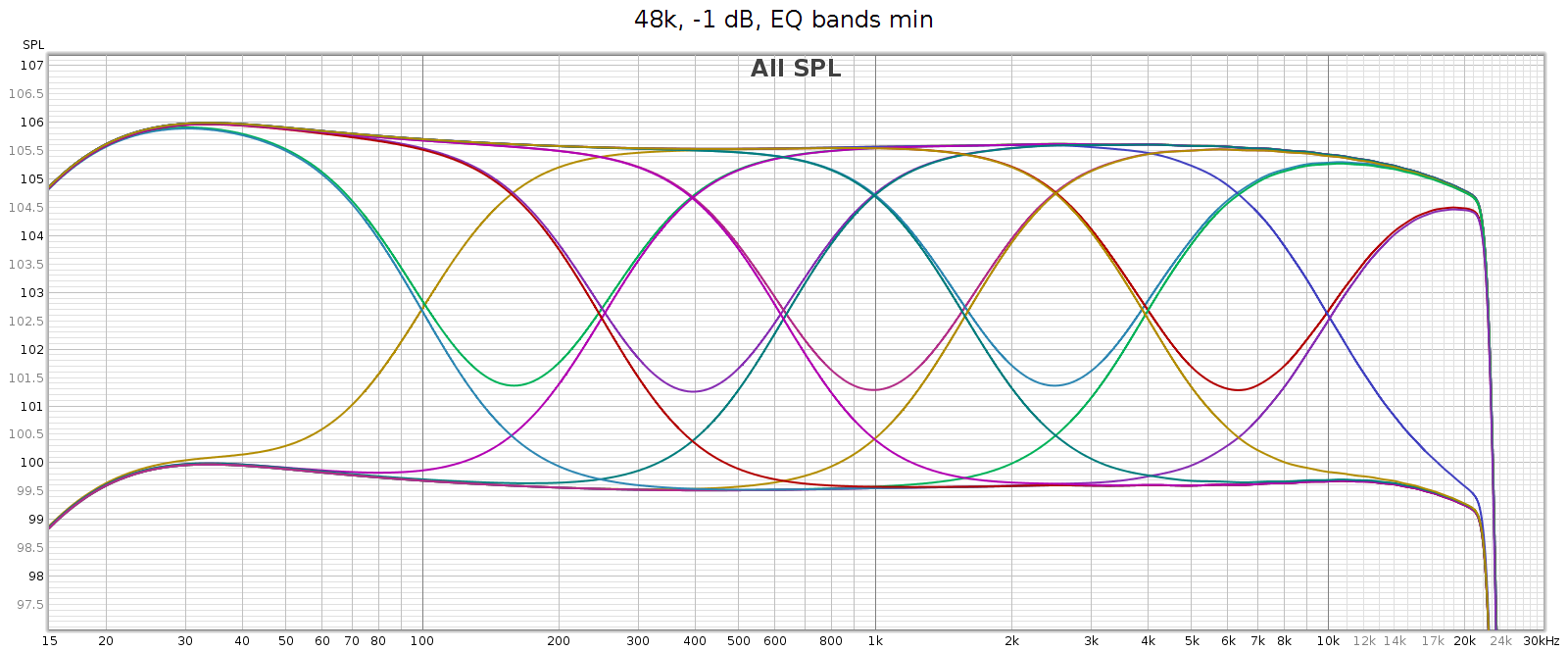
The manual says each band is +/- 6 dB, which is roughly true yet oversimplified. The max effect of any single band is +/- 4.3 dB. Two adjacent bands maxed together is +/- 5.7 dB. Three or more is 6.0 dB.

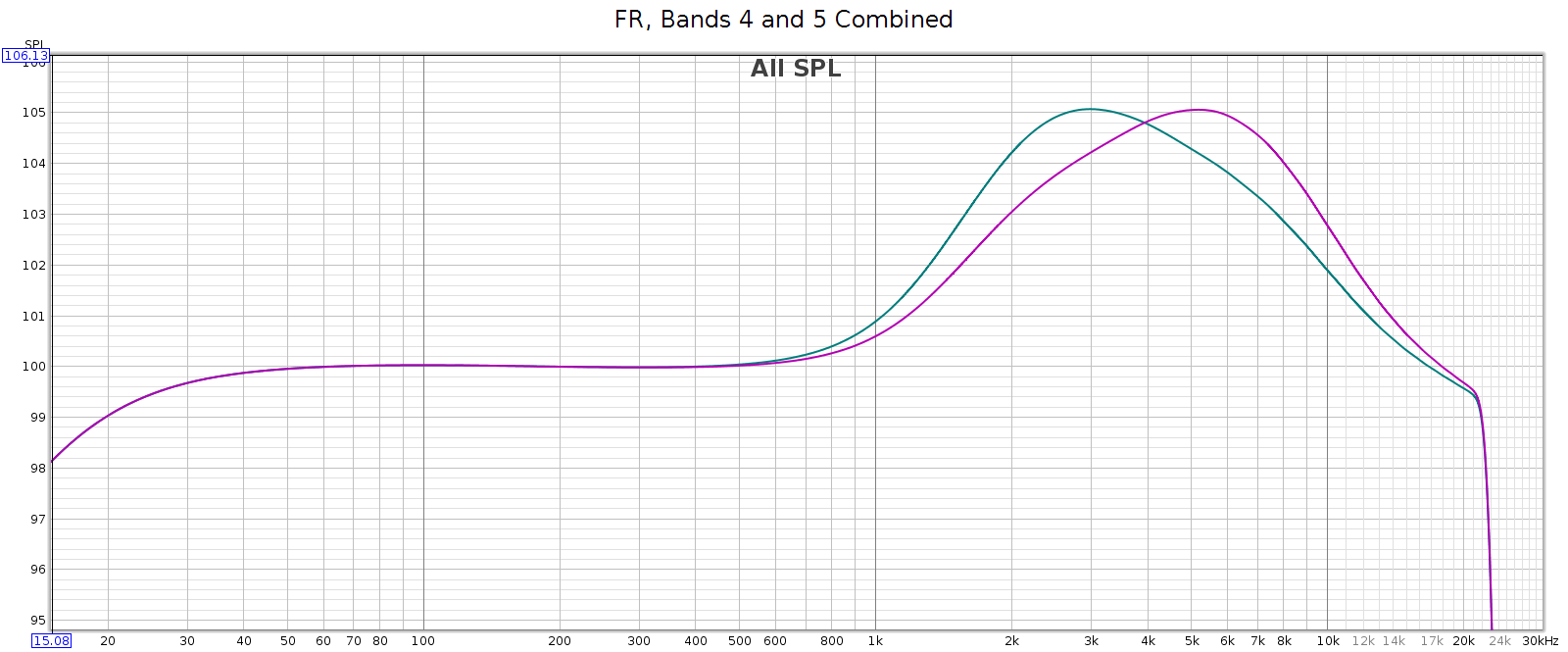
This enables adjacent sliders to be combined to form new bands. For example, consider sliders 5 and 6, centered at 2.5 and 6.2 kHz respectively. What I need to adjust the LCD-2F headphones is a slightly wider band centered at 4 kHz. And that’s exactly what I get when using both together, as you can see in the above frequency response graph. And, you can use different levels of these 2 sliders to shift the combined center frequency a bit higher or lower, to get a center frequency anywhere between 2.5 and 6.2 kHz. This makes the COUNTry’s EQ even more versatile than it appears.

For example, the following chart shows two combos: band 4 at max with band 5 at half (in teal), and band 4 at half with band 5 at max (in magenta). You can see the center frequencies are 3 kHz and 5 kHz respectively.
Regarding slider sensitivity: the following shows the center 1 kHz band at positions 1/4, 1/2, 1, 2, 3, 4, 5 and 6:
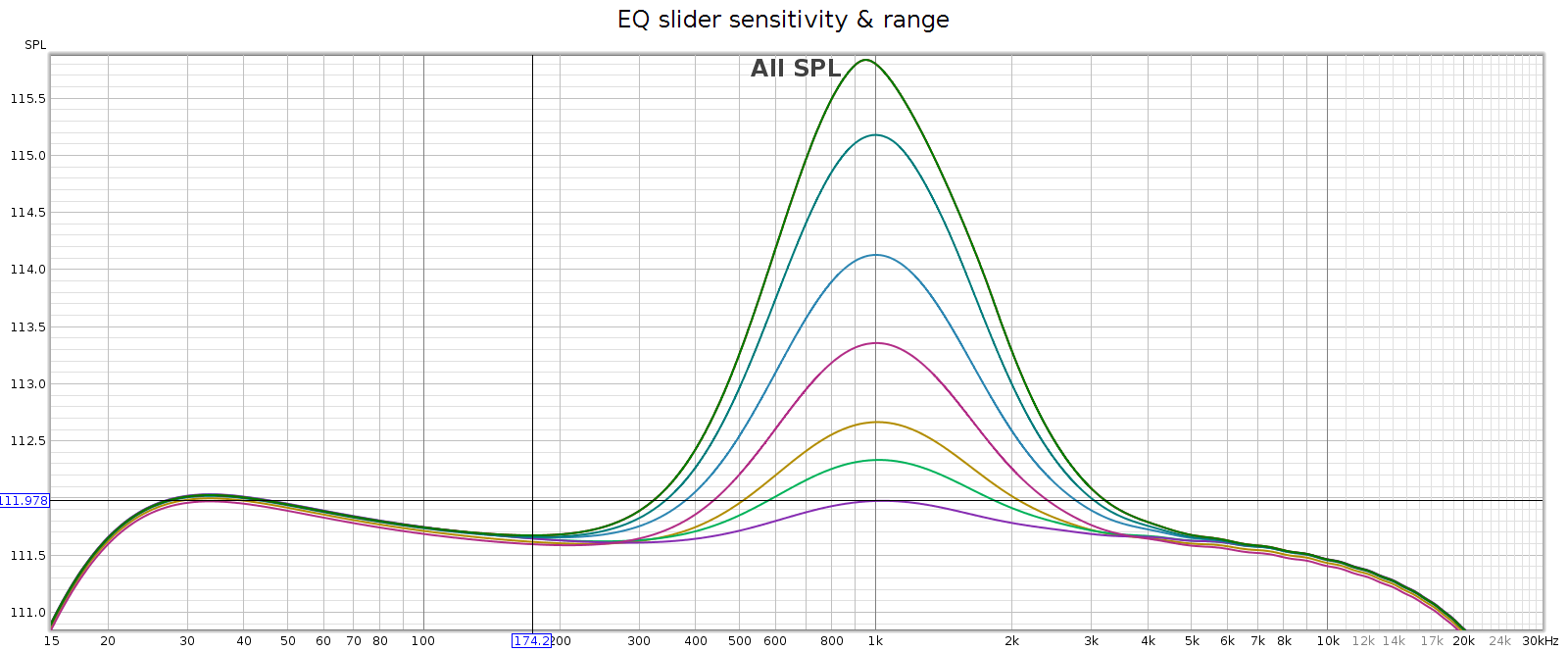
The slider effects are nearly continuous down to a fraction of a dB, allowing very small gradations. Each slider has 6 marked notches on each side (positive & negative), though only the center position is a tactile notch. The first 4 marks are about 1 dB each. The 5th mark is another 0.7 dB, and the 6th / last / max mark is the same as the 5th.

I like this design: it works like a conventional equalizer, but is more flexible. It’s a creative solution to an old problem.

Bass Boost

What: a gentle bass lift starting at 200 Hz and gradually increasing to + 6 dB at 20 Hz. This closely follows the bass attenuation of the popular Sennheiser HD-580 and HD-600 headphones, which is nice. It also mirrors the COUNTry’s bass attenuation in high gain mode, so use it if you want flat response in high gain. Its measured curve is shown twice in the following graph:

  • The top red line versus the green line.
  • The purple line versus the bottom orange line.
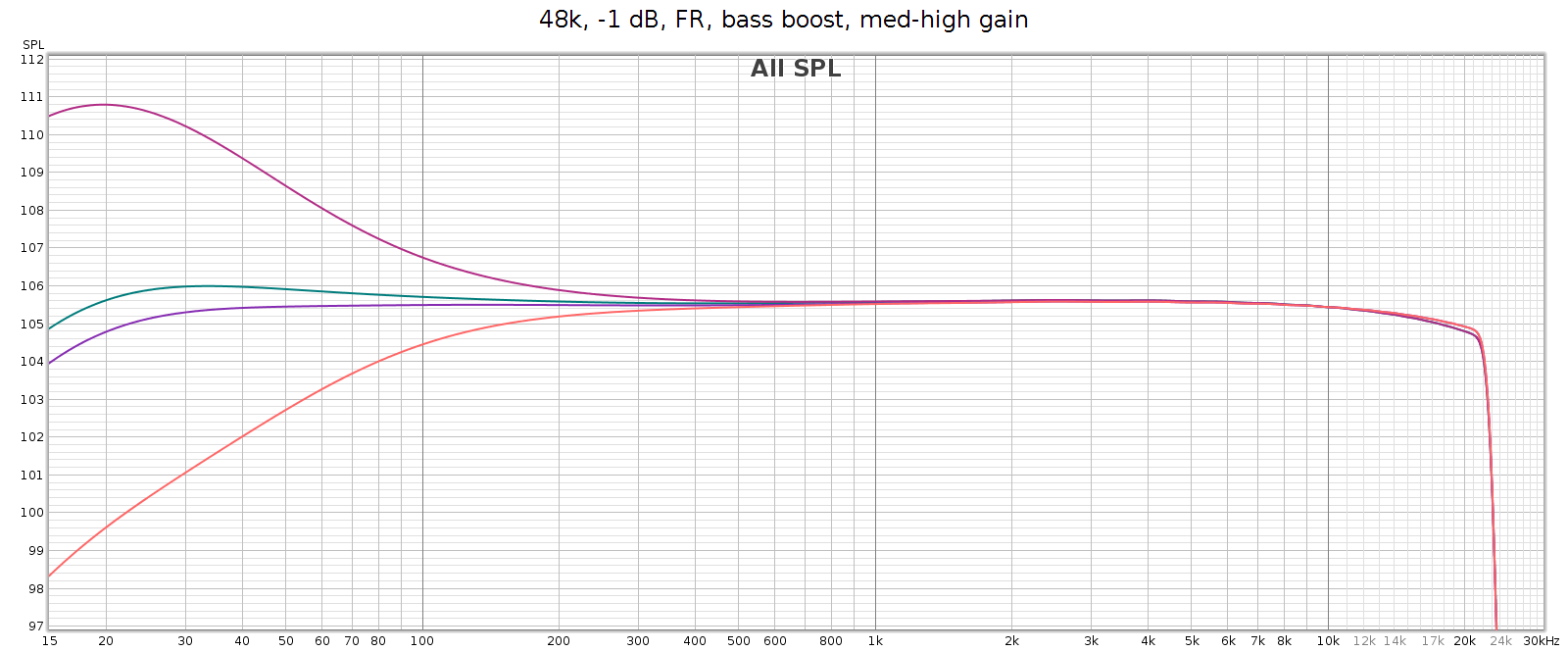
The manual says it’s a shelf boost with center frequency of 45 Hz and Q=0.5, which is true to the measured response. Q=0.5 is such a gentle slope that it is +1 dB as high as 120 Hz (evident in the above graph).

Stereo Crossfeed / Expander

Some recordings have sounds hard-panned to the left or right channels. This sounds wonky on headphones. Unfortunately, this was a common recording technique in jazz albums from the 1950s and 1960s – for example the classic Miles Davis / Coltrane album Kind of Blue. Crossfeed mixes a little of these sounds into the opposite channel, with a brief delay; it narrows the stereo separation. When listening to albums like this, it makes it sound more natural. The COUNTry has 7 levels of crossfeed (the Soul has only 5), and an 8th switch position that is mono (standard mono without crossfeed or delay). I don’t use crossfeed for normal listening, but it’s one of my favorite features because it’s so nice for those albums that need it.

Note: when clicking into mono, the sound suddenly becomes more dull. This effect is purely perceptual – the measured frequency response is exactly the same as in normal stereo.

Stereo expander does the opposite, making stereo wider. It’s intended for speakers but you can hear the effect somewhat on headphones.

Notch Filter

Many headphones have a resonance that causes a spike in frequency response in the 6k to 11k range. The COUNTry has a notch filter that cancels these spikes. Here’s the measured response of all 15 of the settings. It measures true to the specified Q=2.0, -6 dB.
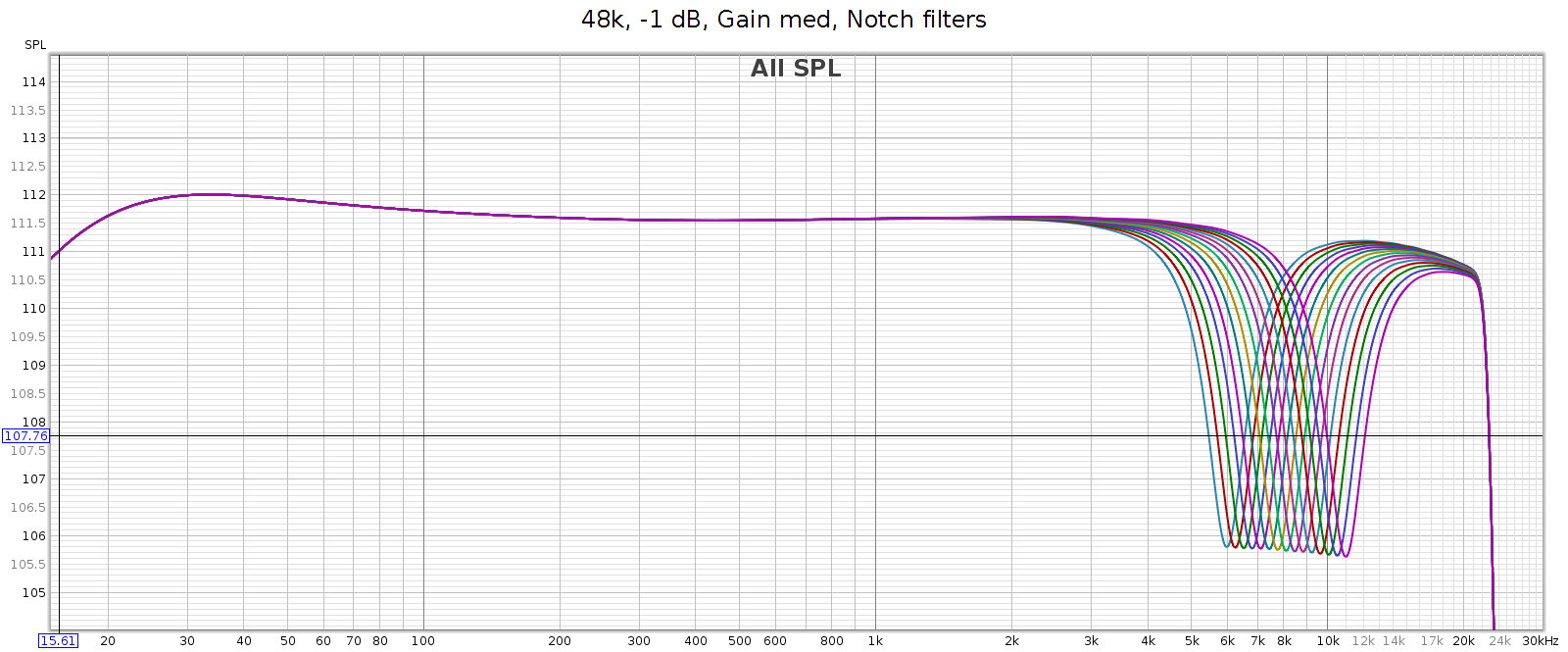
My Sennheiser HD-580 and Audeze LCD-2F don’t have such a spike, so I don’t use this feature. But the Sennheiser HD-800 does, as do many other popular headphones, making this a useful feature.

Reverb

This does exactly what it says: it adds reverb to the music. I’ve tried it with various recordings across a variety of musical styles from classical, to jazz, rock, etc. It’s not my cup of tea, as I prefer dry recordings. Yet this is a personal subjective thing. The reverb sounds natural and well implemented, and has 3 levels to play with.

Volume Control

The volume control feels analog but is digital, having perfect channel balance at every step from max to min. It also lights up an LED at certain exact positions: 0 (max), -6, -12, -18, and -24. This is useful for setting levels to avoid clipping when using DSP features.

Analog Gain

The COUNTry has 3 gain levels for its analog outputs: low, medium and high. Strangely, in high gain it attenuates low frequencies. The manual says this is to reduce excessive excursions of drivers at high levels. This doesn’t make sense to me, since high gain would be used for low sensitivity headphones or amps that need more voltage for the same sound level. And the COUNTry enables you to adjust the low frequencies if you want to. However, the bass boost switch exactly mirrors this bass attenuation, so if you are using high gain mode, turn on bass boost to get flat frequency response.

We’ve heard the mantra “the more gain, the more pain”. This is generally true, due to the constant gain * bandwidth of the transistors & opamps used in amplifiers. Because of this, the best approach is normally to use low gain whenever possible. That is, for a given loudness level, low gain at a higher volume position is usually cleaner than medium or high gain at a lower volume position. This also preserves digital resolution.

Note: This is especially true with conventional analog potentiometer volume knobs, which typically have better channel balance at high settings. However, the COUNTry's digital volume control has perfect balance at all settings. So that's not a factor here.

To test how the gain affects noise & distortion, I measured the COUNTry noise & distortion at each gain setting, with volume adjusted so that each had the same output level. Because the volume knob is digital, I couldn’t match the levels exactly, but I could match within 0.3 dB. More specifically:

  • Low gain at volume -6 dB
  • Medium gain at volume -16 dB
  • High gain at volume -26 dB

Medium gain measured slightly cleaner than high gain, but only slightly. Low gain was about the same as medium gain. So with the COUNTry, the gain level you use doesn’t make a significant difference in distortion or noise. Just select the gain that matches the sensitivity of the downstream device the COUNTry is driving. Of course, remember that high gain attenuates bass so use the bass boost to get flat response.

CD De-Emphasis

As mentioned above, the 7 band EQ has a creative design that eliminates ripple across the bands and enables adjacent bands to be combined to shift center frequencies. However, the highest band (16 kHz) has a special feature. When set to the minimum, it applies the Redbook CD de-emphasis curve. It’s nice to be able to apply this manually since some old CDs use it, they sound much too bright unless it’s applied, and many aren’t formatted properly for DACs to recognize and apply it automatically.

However, the equalizer slider has no indication when this triggers. It triggers at the bottom position, but as you raise the slider, it moves a short distance before disabling de-emphasis and attenuating the 16 kHz band. If you want the most 16 kHz attenuation without triggering de-emphasis, you must do it by ear. Slide it all the way to the bottom, then slowly lift it until the sound suddenly gets a bit brighter. It would be nice to have an indicator that lights up when de-emphasis is activated. The LED on the 16 kHz hand is already used as a power indicator, but it would be nice to have it change color or blink when de-emphasis is activated.

Miscellaneous

The measured impulse response is symmetric and phase response is flat into the high frequencies, which means the COUNTry uses standard linear phase filtering, rather than minimum phase.

The case and knobs are constructed in a manner that appears easy to disassemble and service. It’s good to see this exception to our modern age of cheap disposable equipment. I did not test this by opening the unit, since it is just a loaner.

Support is excellent. You can contact Jan Meier of Meier Audio directly on the company website or on Head-Fi. He is responsive, knowledgeable and helpful.

Usage and Build Quality

The COUNTry is a nice little device with an unusual look. It’s an “old-school” look and feel with physical knobs and LEDs instead of a display screen with menus. It has high build and parts quality.

Some of the indicators are a bit obscure but they become intuitive as you use them. For example, the digital sample rate display is done with 2 LEDs. One for the base rate (32, 44, 48) and another to indicate a multiplier (2x or 4x). Another LED lights up when the volume control is exactly at certain positions: 0 (max), -6 dB, -12 dB, -18 dB and -24 dB. This is a nice guide for setting precise levels.

The rotary switches make a solid “snap” and feel like professional test gear. The toggle switches are similar. The EQ sliders feel like potentiometers,  smooth with just the right amount of friction. The COUNTry is fully digital, so it detects the slider position and translates to a digital value. There is a tactile detent for the center position, but no others indicating when it’s shifted from one value to another. The controls feel good to use.

The headphone jack is seriously robust and overbuilt. The back panel connectors are not as robust but still feel solid. This makes sense as the headphone jack is likely to be plugged & unplugged much more often than the rear connectors.

Sound Quality (Subjective)

OK so what does it actually sound like? I listened on my Sennheiser HD-580 headphones. They are over 20 years old, but have fresh pads and I recently tested them with a MiniDSP EARS rig. They still have measured performance like new. I also used Audeze LCD-2F headphones (also tested & measured). The sound source was my PC with its ESI Juli@ sound card, and lossless FLAC files at bit rates ranging from 44.1 to 192. The Juli@ card coax SPDIF output routed to the COUNTry. I routed the COUNTry’s SPDIF digital output to my SMSL SU-6 DAC and JDS Atom headphone amp. With this setup, I could plug the headphones directly into the COUNTry, or into the JDS Atom. This enabled me to test the differences (if any) between the COUNTry in pure digital mode, versus its D/A and analog outputs.

I level matched by playing white noise, routing the analog outputs to my Juli@ card and measuring the level. With the JDS Atom’s analog volume knob, this enables level matching to about 0.1 dB.

In a word, the COUNTry sounds just a bit brighter than the SU-6 + JDS Atom. I first noticed this with music, and confirmed it with pink noise, which is a useful test signal for hearing subtle differences in frequency response. This brightness was unexpected, since the COUNTry’s analog frequency response has a slight bass boost and treble cut. However, the brightness sounds like it’s in the upper mids / lower treble, rather than in the highest frequencies. Loud parts with many instruments playing (like a symphonic crescendo) are slightly less resolved on the COUNTry analog output, compared to the SU-6 + JDS Atom.

Subjectively, the COUNTry analog output has a good clean sound across a variety of music with no obvious issues or artifacts. Though it’s not state of the art in terms of linearity, smoothness or detail – nor was it intended to be. Think of the COUNTry analog outputs as a sonically competent add-on feature. The COUNTry digital outputs are more transparent.

When you plug in headphones while the COUNTry is playing, it sometimes emits two loud CLICKs in the headphones, then pauses for about 1 second before the music starts. Inserting the headphone plug quickly usually avoids this. Meanwhile, the line level outputs are always playing and do not pause or CLICK. If you power on the COUNTry while it has musical input, you get a single loud CLICK then the sound starts playing in the headphones.

Anomalies

Frequency Response

Analog frequency response is not quite flat, and different in low (blue), medium (green) and high (red) gain. Medium gain has a 0.5 dB lift in low bass, and high gain has a 6 dB drop in low bass. All modes gently taper high frequencies, reaching about -0.6 dB at 20 kHz.
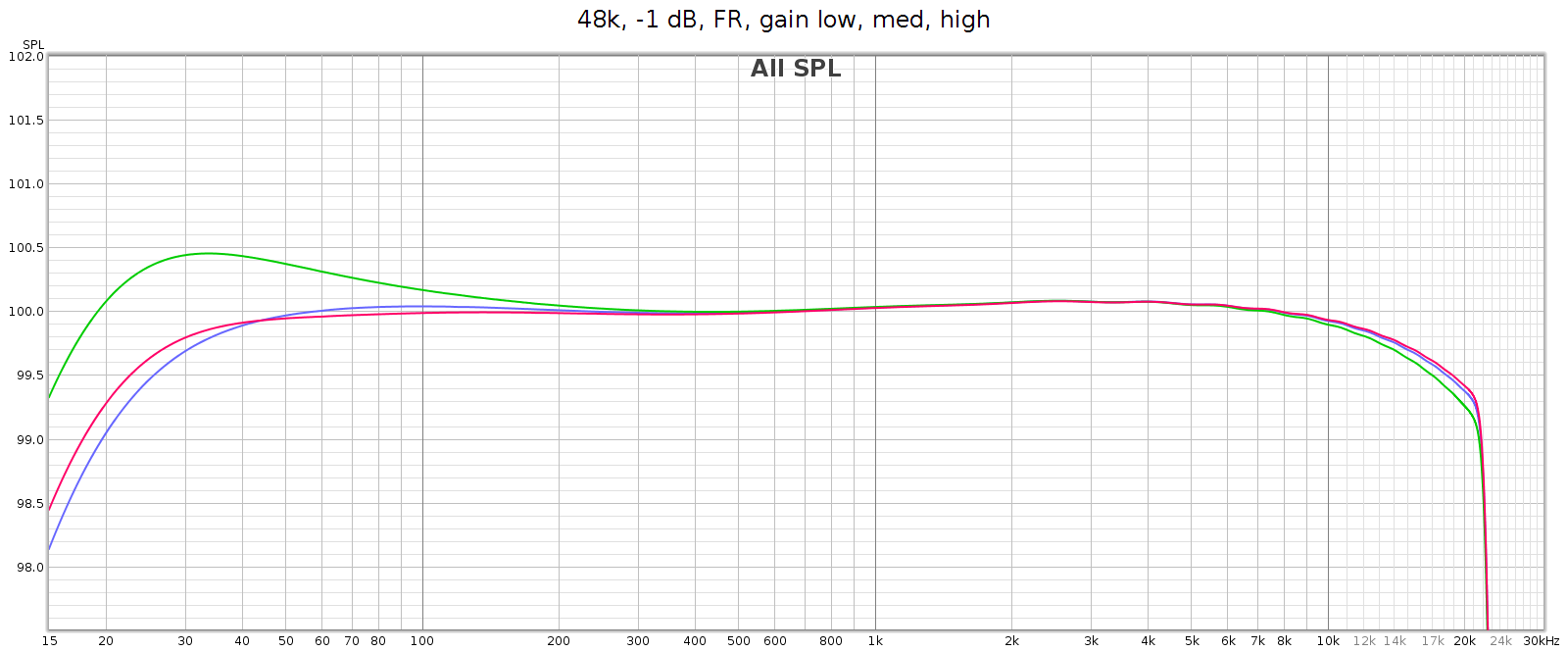
Note: in the above high gain curve (red), digital bass boost was applied to flatten the response. The uncorrected response is shown in another graph below.

Why the frequency response differences at different analog gain levels? This is due to the Meier Audio FF or Frequency Adaptive Feedback. It attenuates low frequencies in the digital inputs, then boosts them back to flat again in the analog outputs. This means the attenuation curve (implemented in DSP) must match the boost curve (implemented in passive analog components). Meier Audio optimized this matching at low gain, since they expect that will be most often used. The purpose of FF is to frequency shape and optimize DA conversion and the gain-feedback loop, so it is only used for the analog outputs, not on the digital outputs.

As mentioned above, in high gain the frequency response attenuates bass beginning at 200 Hz, gradually reaching -6 dB at 20 Hz (this is noted in the manual). The COUNTry has a DSP bass boost that applies the exact reverse of this. So if you want flat response in high gain mode, turn that on (as it is in the above graph).

Let’s take another look at the bass boost frequency response graph shown earlier. From bottom to top:

  • Orange is high gain
  • Purple is high gain with bass boost activated
  • Green is medium gain
  • Red is medium gain with bass boost activated

The COUNTry’s digital output is smoother and more linear, but still has gentle HF attenuation reaching -0.6 dB at 20 kHz, and even gentler LF attenuation about -0.2 dB at 20 Hz. We see below that this slight attenuation happens in the digital domain. This graph shows the digital output with all sampling rates on top of each other:
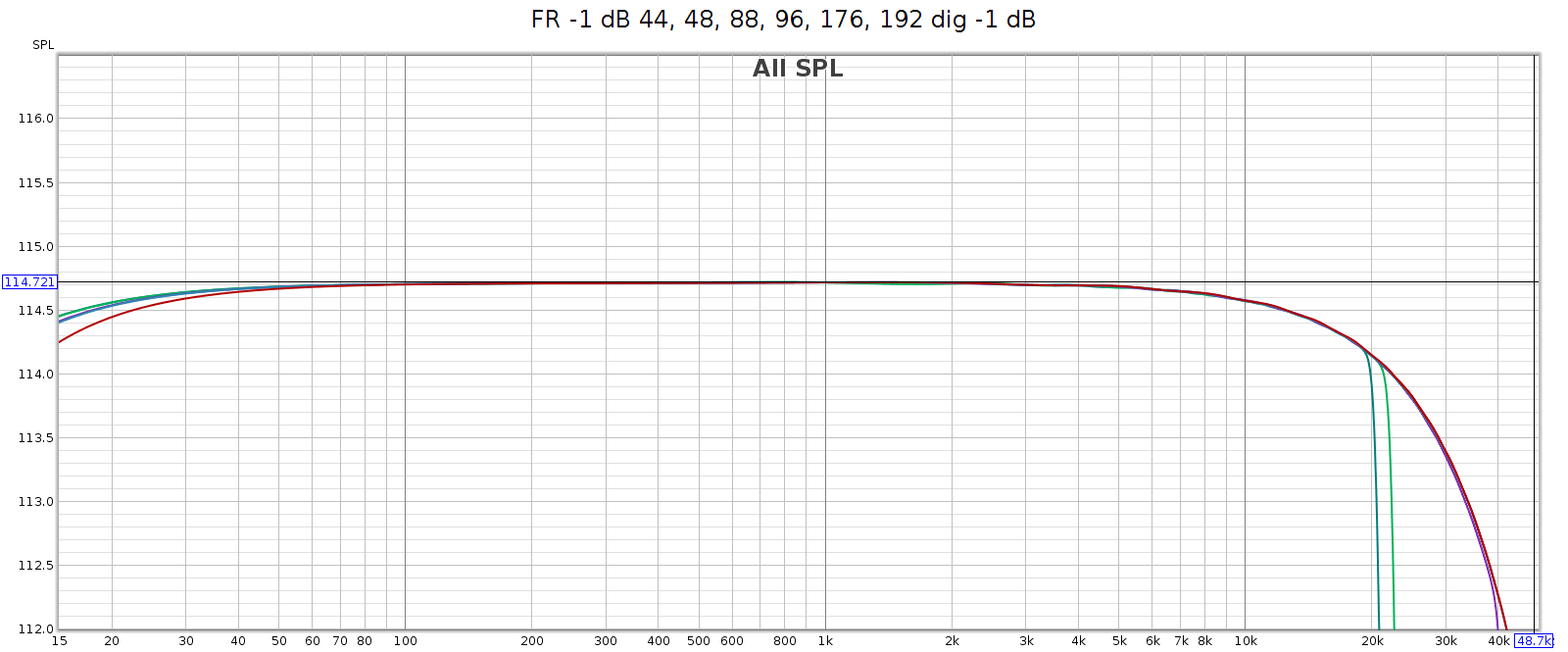
Noise at High Sample Rates

At high sample rates (176.4 and 192) the COUNTry has a lot of high frequency noise. This is unexpected and unusual, so I tested in several different ways:

  • Analog outputs
  • Analog outputs at lower levels (-6 dB, -12 dB)
  • Analog outputs with lower digital input levels (to -48 dB)
  • Analog outputs with input from my phone (USB Audio Player Pro) in bit perfect mode, instead of from my computer (ESI Juli@ sound card)
  • Digital outputs
  • Digital outputs at lower levels (to -48 dB)

It measured the same in all cases. This suggests the issue is not in the D/A conversion or analog stage, but in the DSP.

Here’s what that noise looks like at 176.4 kHz. Actually, in the graphs below it looks like distortion rather than noise, but more on that later. The horizontal line at y=0 dB is the sweep signal. It is not really at 0 dB, but this is relative to facilitate reading the levels. The brown line is noise. The black line is THD. The colored lines are 2H, 3H, etc., which sum to the black line.
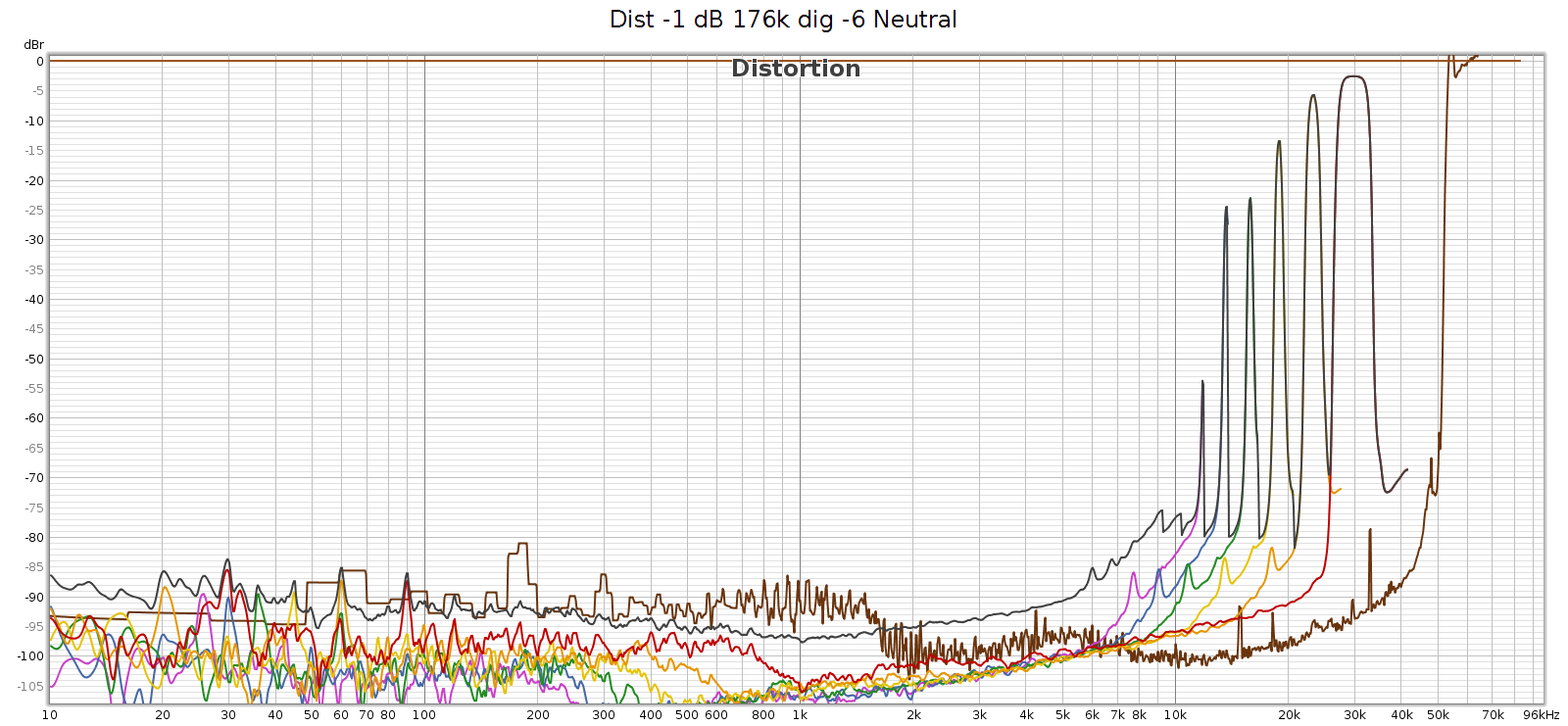
At 176.4k, it’s clean up to 11 kHz and that first distortion spike is at 11,960 Hz. This is inaudible since it’s 7th harmonic so the distortion tone is at 11,960 * 7 = 83,720 Hz. However, these distortion spikes are big enough that their intermodulation (IM) differences are in the midrange. They are spaced 1-3 kHz apart, which puts the IM smack-dab where our hearing is most sensitive to it.

Here’s what it looks like at 192 kHz:
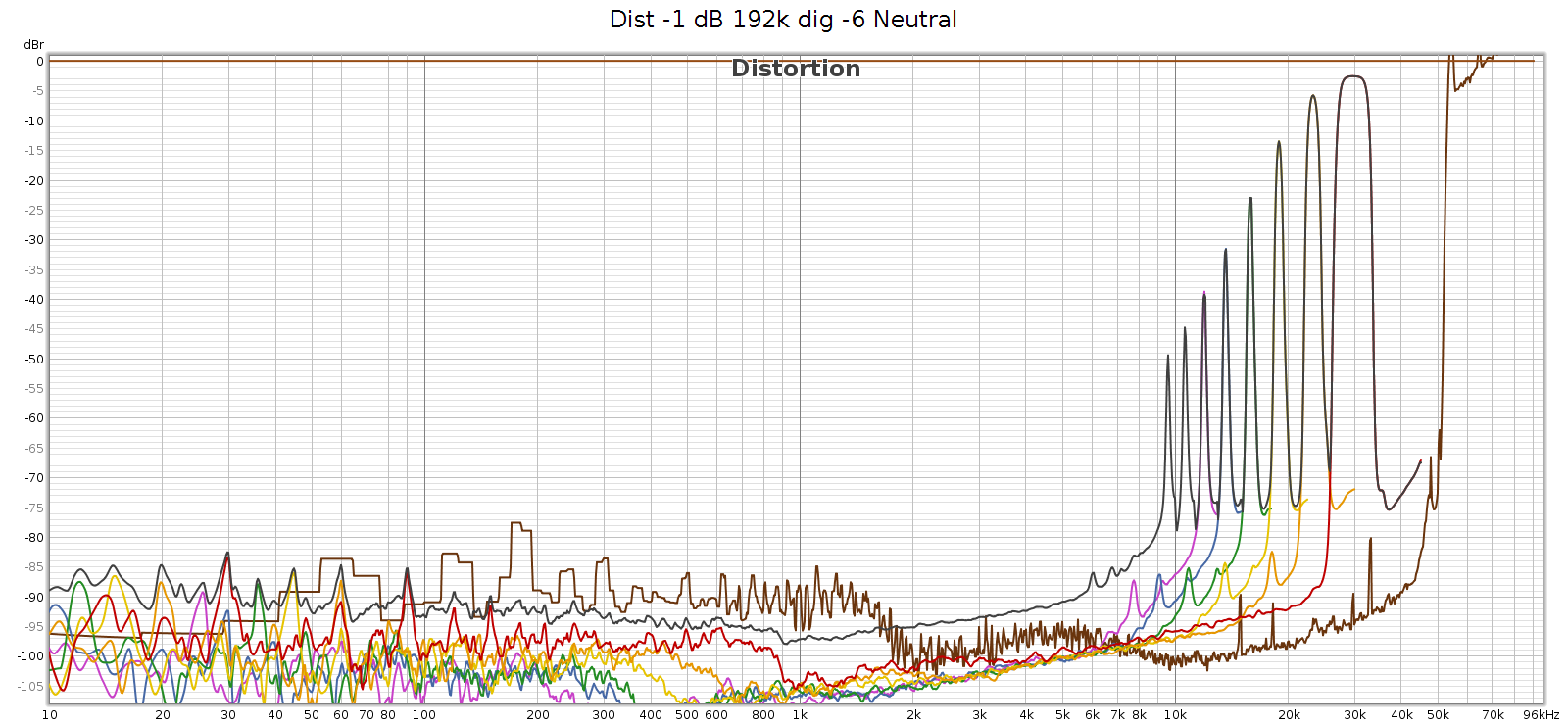
At 192k we have a similar situation, first distortion spike at 9,580 Hz, which will be inaudible since it’s 9th harmonic so the distortion tone is at 9,580 * 9 = 86,220 Hz. The 7th, 6th, and rest of harmonics are the same as at 176.4k sampling. And as above, the IM difference tones will be in the midrange.

Two interesting observations about these frequencies:

  1. They are exactly the same at 176.4 and 192 kHz. This suggests it is noise, not distortion – it’s not correlated with the signal.
  2. They all point to noise in the same region: 53 to 86 kHz

More precisely:

  • H9 @ 9,580 Hz means a frequency at 86,220 Hz
  • H8 @ 10,620 means 84,960
  • H7 @ 11,960 means 83,720
  • H6 @ 13,640 means 81,840
  • H5 @ 15,870 means 79,350
  • H4 @ 18,940 means 75,760
  • H3 @ 23,320 means 69,960
  • H2 @ 30,000 means 60,000

Here’s my speculation as to the root cause. Something in the COUNTry (perhaps a switching power supply?) is operating at 65 kHz. This is not fully suppressed or filtered and is leaking (somehow?) into the digital data. At sample rates 96k and lower, it’s above Nyquist and thus digitally filtered. But at 176.4 and 192, it’s below the Nyquist limit of 88.2 and 96 kHz respectively, so it is in the passband. Thus this power supply switching noise appears as harmonics of the given lower frequencies. If so, then it’s not really distortion, it’s noise.

Wherever the source of this noise, it’s interesting to study it closer. I created another graph below for this. Noise goes through the roof (literally – greater than 100% or louder than the fundamental) with spikes at 54.6 and 65 kHz. This noise profile and the spike frequencies are exactly the same at 176.4 and 192 kHz, so it’s independent of sampling frequency. It looks like this noise is what the graph (incorrectly) shows as distortion. Each of the N harmonic spikes is simply that same noise frequency divided by the next larger number (2nd, 3rd, 4th, etc.). Note that noise above the 0 dB line is not a bug. The spike at 65 kHz at +10 dB means it’s 10 dB louder than the signal.
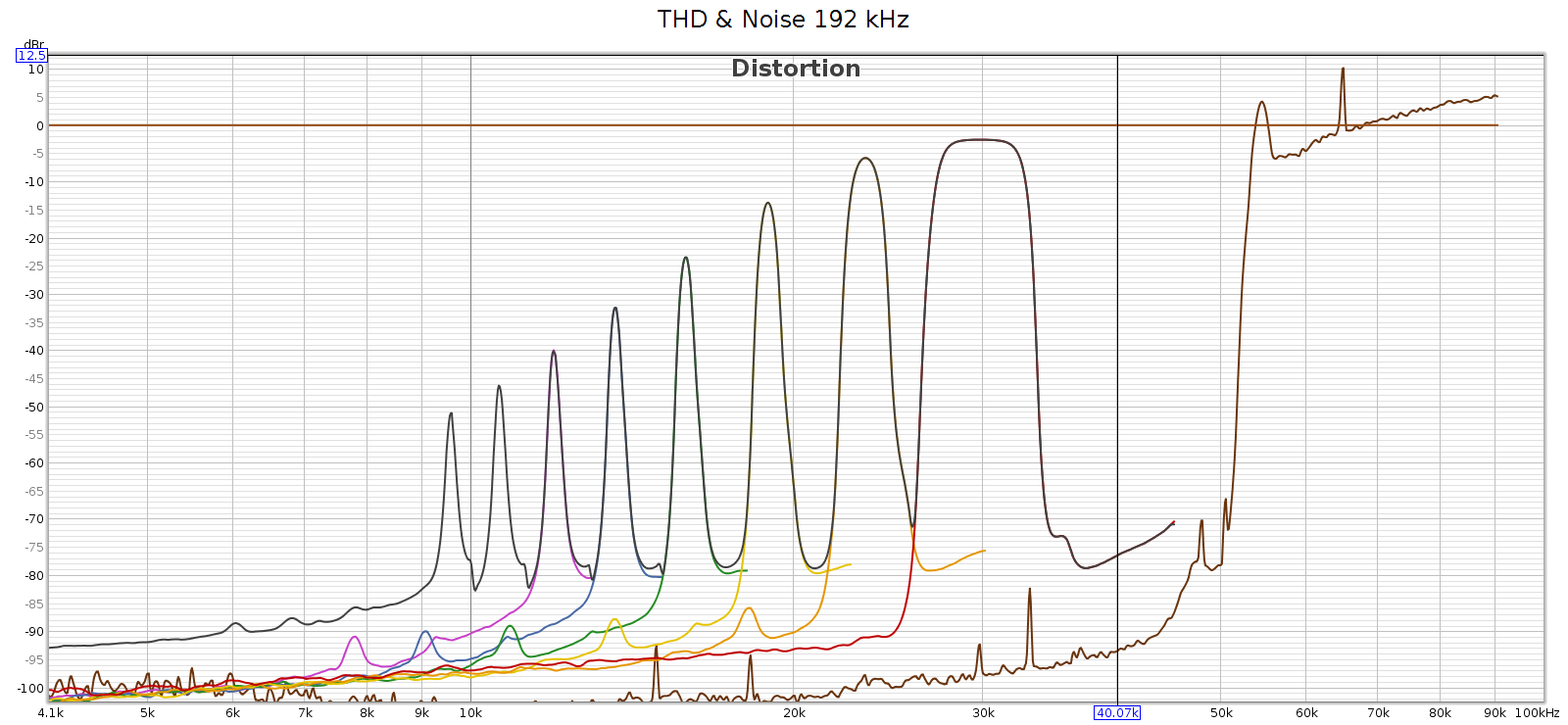
In case this noise were caused by the high level of the digital signal (even though it wasn’t clipping), I ran another sweep at -48 dB. The noise profile looks the same:
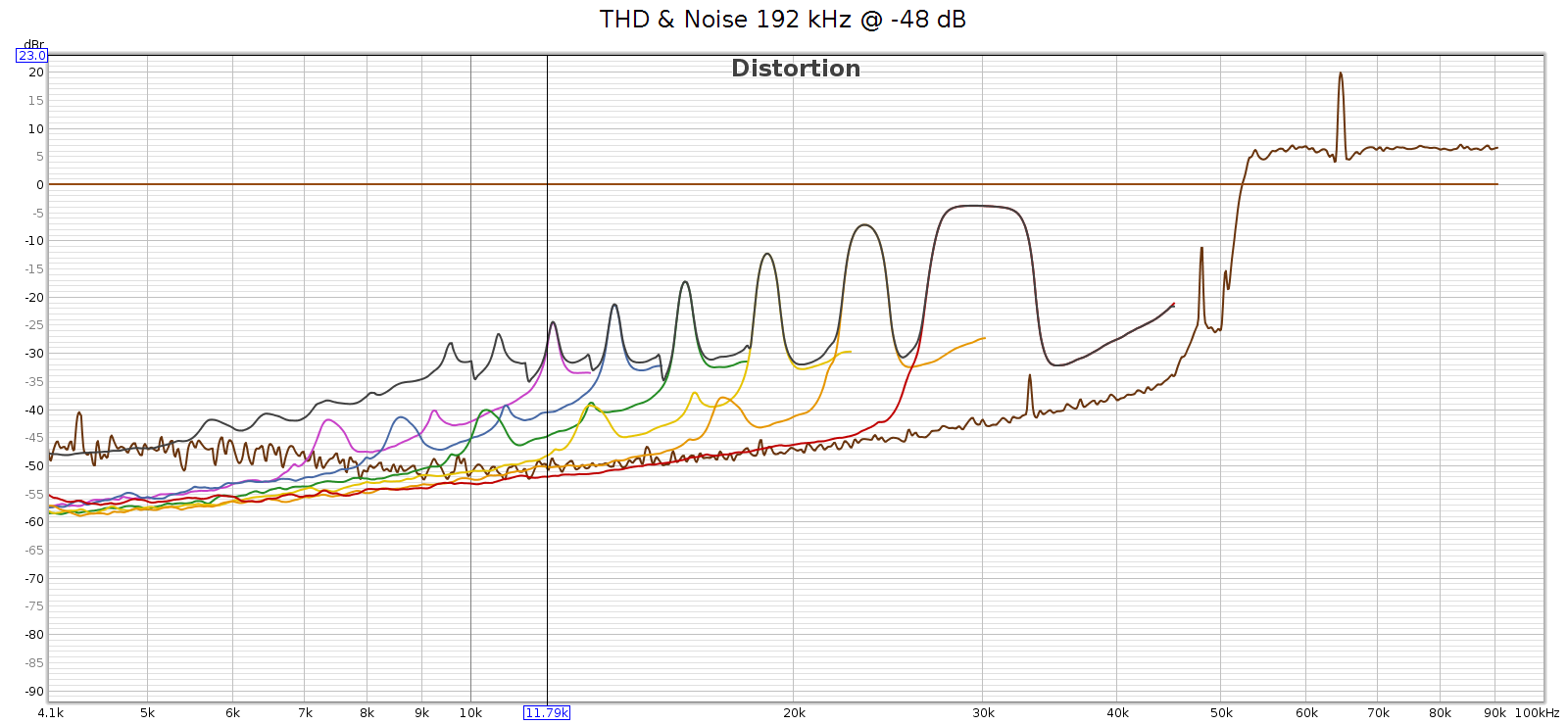
In short, the noise is a constant level, and a constant frequency spectrum. It’s independent of the sample rate and of the input signal. This suggests it’s noise not distortion.

I said earlier that I was speculating – let me clarify. What is not speculation, but observation, is a lot of supersonic noise at high sample rates. My speculation is toward the root cause. I love a good puzzle and this explanation fits the observations. But I don’t really know what is causing that noise. So let’s set root cause speculation aside…

For comparison, here’s the COUNTry distortion and noise at 96 kHz, measured at the analog outputs at medium gain:
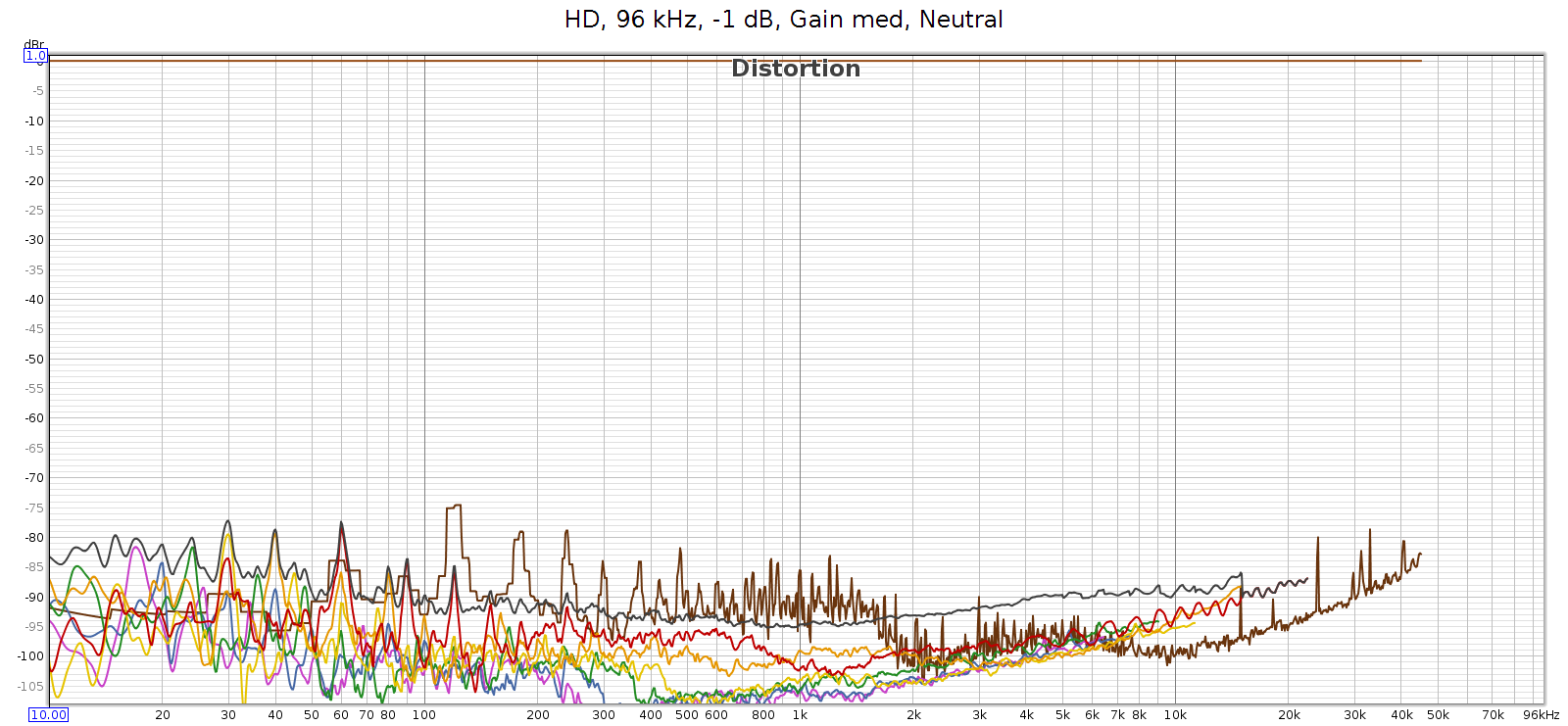
BTW, see that drop in noise & distortion from 700 to 2,000 Hz? I’m guessing this is the previously mentioned FF at work.

Here’s the distortion and noise of the measuring system, my ESI Juli@ sound card in loopback:
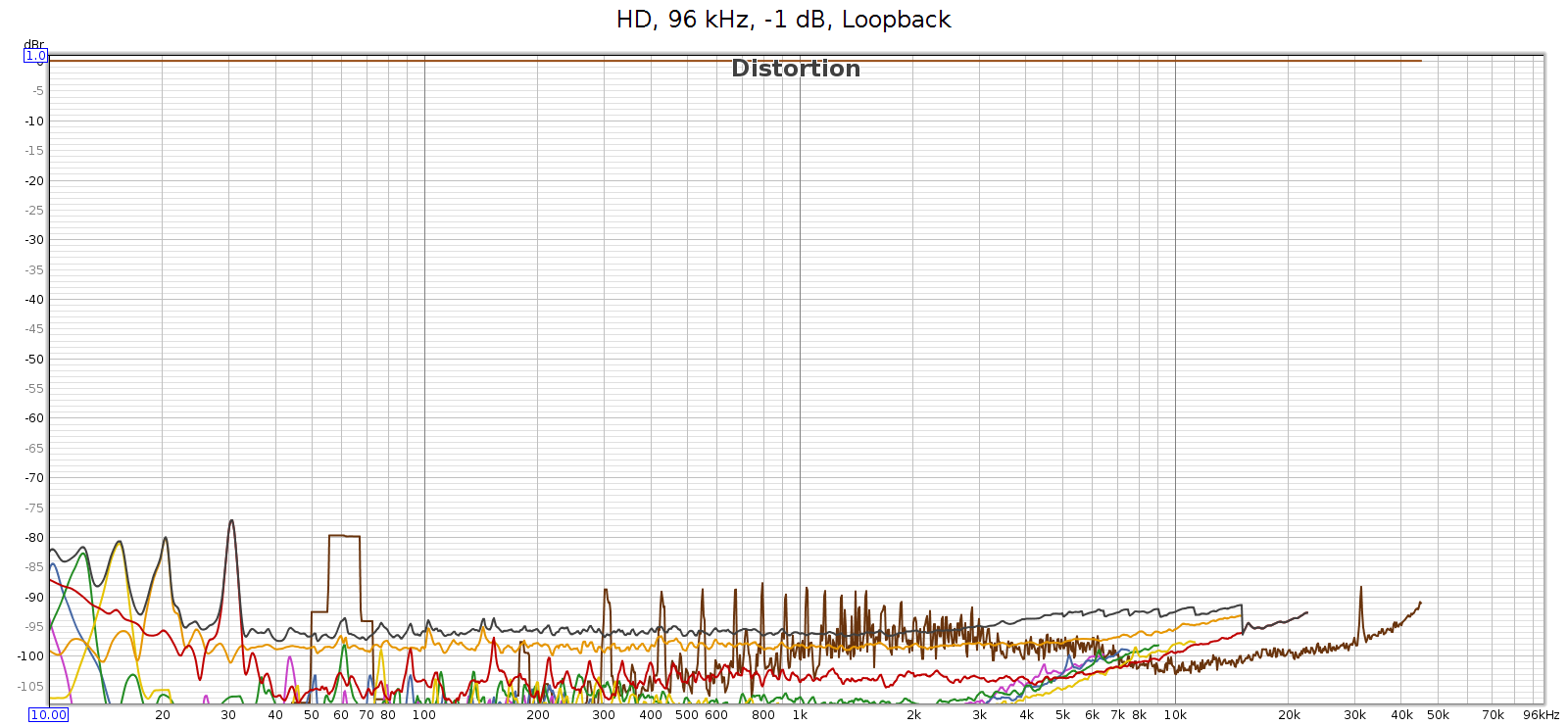
This typical of all sample rates 96 kHz and lower. So the COUNTry’s D/A and analog output is pretty clean – just a bit higher than the loopback connector, but not much. This should be well below audible levels.

Finally, I used Audacity to under-sample the 192 kHz test signal to 96 kHz, then played it through the COUNTry. The output looked clean, just like the 96k signal above. As expected.

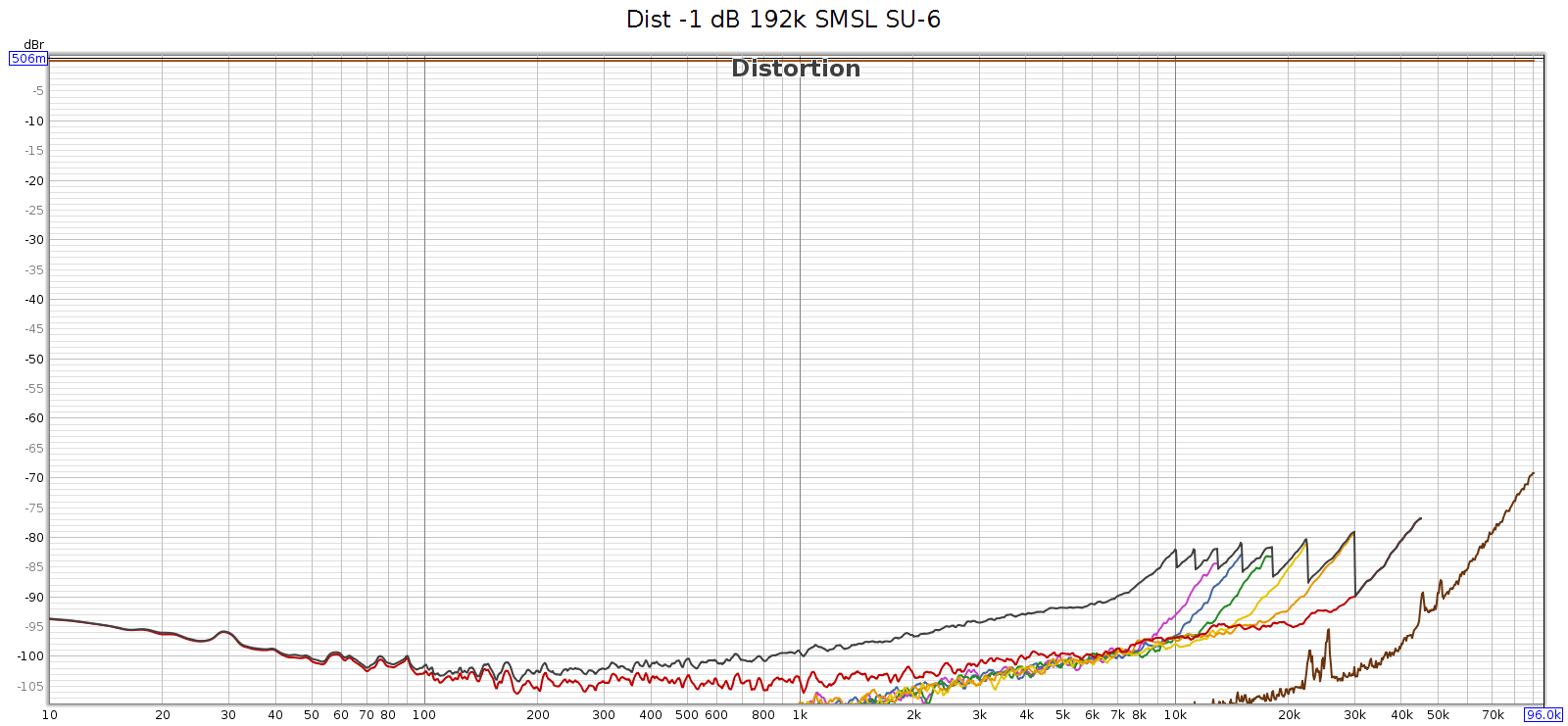
Just in case the issue was with the 192 kHz tone itself, I measured how the SMSL SU-6 reproduces that test sweep signal, directly without the COUNTry. You can see those rising harmonics, but they cut off around -80 dB. This is the inherent noise and distortion of the Juli@ card’s analog input and A/D converter.
Conclusion

The COUNTry is a unique device. At 1 kilobuck it’s rather pricey, but considering its functionality, as an all-in-one device it replaces several others: DAC, amp and EQ with DSP. If you bought these separately, the total cost might be similar. And the COUNTry’s DSP features are unique and well implemented – you might not be able to find such a flexible EQ, or DSP with crossfeed or reverb. It’s built to last and the sound quality, both measured and subjective, is quite good if not state of the art. Used in purely digital mode, it should be sonically transparent, at least up to 96 kHz.

Meier Audio sent me one on request because I was curious about it. I don’t get to keep it. Yet over an extended trial using it nearly every day, here’s what I like best about it:

  • The flexibility of the EQ (shifting center freqs by combining adjacent bands) enables me to match the LCD-2F and HD-580 headphones, and most others.
  • The crossfeed is nice especially with albums having hard-panned L-R stereo separation.
  • Flexibility to be an all-in-one device or run in digital-only mode.
  • Works with my various audio systems with no observed software/firmware bugs.
  • Good quality, seems built to last with good support.

Suggestions for improving the COUNTry:

  1. Fix the HF noise/distortion issue at high sampling rates. The solution likely involves hardware changes to filter/suppress/isolate noise from the switching power supply.
  2. For improved transparency, make a version that runs DSP at the native sampling rate of the source without resampling. If this is not possible due to DSP memory or processing limitations, then over or under sample at integer multiples. Example:
    1. Implement all DSP at 2 rates: 88.2 & 96
    2. Input at 44.1, 88.2 and 176.4, resample and process at 88.2
    3. Input at 48, 96 and 192, resample and process at 96
  3. Eliminate the bass attenuation in high gain mode.
    1. Sure you can normalize it with bass boost, but better to give it flat response like low & medium gain. This simplifies COUNTry usage and obviates the need for bass boost, so you can replace it with a different function.
    2. Not really an issue for me, since low gain is plenty for my headphones.
  4. Provide an indicator when CD de-emphasis is activated (perhaps change the color of the 16k EQ band).
  5. One of the nice things about the COUNTry is that due to the physical knobs you can see all the modes at a glance. But the knob detents are hard to see. If I owned this device I’d fill the detent notches with white paint.

Of the above, the the only ones holding me back from buying the COUNTry are the first 2 items. Eliminating the high frequency noise is most important, and improving the transparency of resampling is second.

Meier Audio makes another version of the COUNTry that resamples everything to 96 kHz instead of 192 kHz. This 96k version has a more complex implementation of bass boost, called bass enhancement. It’s quite an interesting feature that leverages the psychoacoustic phenomena known as the “false fundamental”. As cool as that is, this 192k version has certain advantages, even if one doesn’t care about the difference in sample rate:

  • Bass boost exactly offsets the analog bass attenuation at high gain. The 96k version has no way to do this, since it replaces boost with enhancement.
  • Bass boost closely offsets the bass attenuation of several headphones, especially the Sennheiser HD 580/600/650/800 models.

Note that neither of the above reasons has anything to do with 96k versus 192k sample rates. In my opinion, 192k offers no real advantage over 96k because whatever advantages are gained from rates higher than the 44.1k CD standard, are fully realized at 96k. In fact, 192k is actually a disadvantage because it can allow ultrasonic noise that is not a concern with 96k. The above is an example of this.

Update: Apr 2023

Meier audio has a new version of the COUNTry:

  • Performs all DSP at the native sample rate (32, 44.1, 48, 64, 88.2, 96, 128, 176.4, 192)
    • Digital-only mode has no resampling, should be fully transparent
  • D/A conversion is always done at 96k, since the WM8716 chip is optimized for this rate
    • The analog audio output is resampled to 96k before D/A conversion
  • Equalizer step sizes are 0.5 dB resolution
  • Reverb replaced with 3 levels of bass boost (50 Hz shelf, Q=1.0) +2, +4 and +6
  • The original bass boost (45 Hz shelf, Q=0.5, +6 dB) is retained, and can be applied in addition.
Analog vs. Digital

From Merriam Webster:

Analog

  1. of, relating to, or being a mechanism or device in which information is represented by continuously variable physical quantities
  2. something that is similar or comparable to something else either in general or in some specific detail : something that is analogous to something else

Digital

  1. composed of data in the form of especially binary digits
  2. of, relating to, or using calculation by numerical methods or by discrete units

In terms of storing, transmitting and playing audio, each term is ambiguous, yet their different meanings are similar, which leads to confusion.

Analog

The key phrase with meaning 1 is “continuously variable”. A turntable needle tracking a record groove, a tape deck head responding to fluctuating magnetic fields on tape, are both continuously variable. Reflective and non-reflective spots on a CD are not continuously variable – it either reflects a laser beamed at it, or it doesn’t. A square wave transmitted along a wire is not continuously variable – it is either at its max voltage, or its min voltage, nothing in between.

However, if we look more closely at the last two examples, we realize that they really are continuous. A reflective spot on a CD doesn’t reflect back 100% of the light; it’s not perfectly smooth, some of the light is scattered and lost. Conversely, a non-reflective spot does reflect back some tiny amount of the light, even though it absorbs or scatters most of it. And while all the spots of the same type (reflective or not) are similar, they are not exactly the same; each is unique. A square wave does not switch from high to low, or low to high, instantaneously. That would require infinite rise time, which is impossible. And as it approaches the new voltage, it will overshoot or undershoot just a bit before it stabilizes. So the voltage actually does vary continuously from the high to low value, even if it spends 99.99% of its time at a high or low value. In this sense neither of these are as discrete as they first seem; they are almost but not quite discrete, but actually continuous.

In fact, the universe at the super/macro scale at which we perceive and manipulate it, is continuous. It only becomes discrete at the micro/subatomic/quantum level.

The other sense of “analog” is that it is an “analog” of, or actually resembles the thing it represents (closely related to the word “analogy”). A magnetic tape that encodes music, has a strong field where the music is loud and a weaker field where it is quiet. A turntable needle tracking a record groove physically moves over a bigger amplitude when the music is loud, smaller when it is quiet. The shape of the groove itself resembles the waveform of the music being played.

Music as we experience it, and as it passes through air as vibrations and pressure changes, is continuously varying. Analog storage of music fulfills both definitions of the term: it is continuously varying, and it physically resembles the music (in some way, directly or indirectly).

Digital

The first definition refers to binary digits. However, this does not fully capture the sense of what it really means. The rational numbers are continuously varying, in the sense that they are infinitely dense: between any two of them, no matter how close they are, lie infinitely many more. Mathematically, the rational numbers are not a true “continuum”, as they have holes – by holes I mean numbers that we know must exist since they are the solution to simple algebra problems, yet are not rational. For example, the square root of 2.

Yet pragmatically speaking, this is a distinction without a difference. It is impossible to detect the difference between rational and real numbers through observation or measurement of the physical world. For every irrational number R, for any small value ε, we can pick a rational number Q so that | R – Q | < ε. We can pick ε smaller than any means of physical observation or measurement. Indeed, ε can be smaller than relativistic uncertainty principles permit. So even in theory, not just in practice, it is impossible to discern the difference in the physical universe. The difference between rational and real numbers does exist, but it is a mathematical distinction, not a physical one.

So for purposes of analog vs. digital, the notion of “infinitely dense” is a sufficient interpretation of what “continuous” means. Numbers can be continuous. Of course, numbers can also be non-continuous or discrete: like the counting numbers.

Even binary digits can be continuous. Every rational number can be expressed in binary digits, though some of them require infinitely many binary digits. For example, 1/7 in binary is 0.001001001… but that is still a well defined and valid number. When people use the term “binary digit” they often mean stored in a computer. But binary is simply a numbering system. It can be, but doesn’t have to be, stored in a computer.

However, in a computer the manifestation (storage, transmission, computation) of numbers is necessarily finite. Thus these numbers cannot be “infinitely dense”, which means they cannot be continuous. They are discrete numbers – even floating points, because they have finite resolution.

Because numbers can be either continuous or discrete, they are a poor concept on which to base the definition of “digital”. So much for Webster’s definition 1; that colloquial usage leads to confusion.

A better concept is definition 2: that of being “discrete units”. Storing or encoding data as a set of discrete states. We often use computers and binary, but the number of states is immaterial: it can be 2 (binary), 3 (trinary) or whatever.

In short, a big part of the confusion around the term “digital” is this: Just because it uses numbers, doesn’t mean it must be discrete. And just because it’s discrete, doesn’t mean it must use numbers.

Digital audio is discrete, and it uses numbers. The first is essential, the second is an incidental convenience.

Once again: truly discrete phenomena do not exist in our universe at the super-macro atomic scale. Discrete means a set of states with nothing in between the states. This is easy to understand from an abstract logical perspective. But shifting between physical states cannot be instantaneous, because that would require an infinite rate of change, which requires infinite energy/power.

Manifestation vs Meaning

Put differently: what it is vs what it means

Put differently: the signal, versus the information

A signal is a phenomena in the physical universe that encodes information. The signal can be a radio wave, a telephone transmission, handwriting on paper, scratches on a clay tablet, etc. Signals contain or encode information. The sender translates or encodes the information into the signal. The receiver decodes the information from the signal.

All signals are continuous, by the simple fact that they exist in our universe which does not have discrete phenomena at the macro/super scale. But this does not imply that all signals are “analogues” of the information they encode. Some are, some are not. That depends on the encoding.

The same signal could have different meaning, depending on the encoding. If the sender and receiver do not agree on the encoding, they may believe the message has been successfully transmitted, when it has not. The receiver might decode the signal in a different way than the sender encoded, and thus receive a different message.

This illustrates the fact that the signal, and the message or information it contains, are two different things. One is physical, the other logical. Signals cannot be discrete, but messages/information can be either discrete or continuous.

We can encode discrete messages into continuous signals. For example: consider the discrete binary message 11111100110 (which happens to be 2022, the current year). We can encode this into a series of voltage pulses each of fixed duration, encoding each 1 as 1.0 V and each 0 as -1.0 V. The receiver can easily extract the 1s and 0s from the signal.

However, somebody who doesn’t know the encoding scheme may receive this signal and not even know whether it contains a message, let alone what that message is.

Advantage: Digital

So what is the big deal behind digital audio? Why back in the 1980s was it called “perfect sound forever”? It’s neither perfect nor forever, so where did that phrase come from?

When encoding information into a signal, and decoding it from a signal, discrete states have certain advantages over continuous varying. Consider the above example of positive and negative voltage pulses. The receiver doesn’t care exactly what the voltage is. He can interpret any positive voltage as a 1, and any negative voltage as a 0. If the signal gets distorted, like a bunch of ripple added to it, or the peaks vary between 0.7 and 1.3 instead of exactly 1.0, it won’t change the message. The receiver will still receive it perfectly intact. Of course, under extreme conditions the signal could be so distorted that the message is lost, but that takes a lot of distortion. Encoding information as discrete states is robust, and in most normal cases delivers perfectly error-free messages.

Now consider an analog encoding of information, like a turntable needle tracking a record groove or a tape deck head detecting the magnetic field on tape passing by. Here, the encoding is continuously variable. Every tiniest wiggle or variation has meaning, it is part of the message. Indeed, high quality audiophile equipment is designed to respond to even those smallest subtle signal changes. If the signal gets distorted, even slightly, the distortion becomes part of the message. This encoding is not robust; it’s much more difficult to tell the difference between the encoded message, and any distortion that signal may have suffered.

Summary

For precision, let’s use “discrete” instead of “digital” and “continuous” instead of “analog”.

Digital audio is information. The original music is a continuous phenomena, and is encoded into information as discrete states. Those discrete states are encoded into continuous form for physical storage and transmission, and can be decoded back into discrete states. We use this discrete encoding because it is more robust, relatively immune from imperfections and distortions in transmission and storage, which makes possible perfect transmission that is not possible with information encoded in continuous forms.

In short, digital audio is “digital”, but the means by which we store and transmit it is “analog”. We encode the digital audio information into analog form or signals, and decode or extract the digital information from the analog signals.

The theory and physics of discrete vs. continuous information and signals has been known since Claude Shannon and others developed information theory back in the early 20th century. The Shannon-Whittaker interpolation formula which is the basis for analog to digital to analog conversion, was known at least since the 1930s. So why didn’t digital audio exist until the 1980s? The reason is computing power – or lack thereof. The range and resolution of human hearing is high enough that it requires a lot of digital data to attain sonic transparency. We knew how to do it, but it took decades for computing technology to get fast enough to process the volume of digital data required.

Bikes: Seat Failure?!

Yesterday I took my old city bike for a ride. It’s my brother’s old Trek 330 from the 1980s that I converted to a single-speed with a 2-speed Sturmey Archer kick-back shift rear hub, and mustache handlebars. It’s a cool old vintage bike that’s fun to ride.

About 14 miles into the ride, just after I turned around to head home, the seat suddenly rotated back as if the bolt were loose. I stopped and got out my tools, ready to tighten it. But it wasn’t loose. One of the seat rails had sheared or snapped off! It’s made of metal! I’m not a big heavy guy so I have no idea how this happened. In over 40 years of riding and working on bikes I’ve never seen a failure like this. Then a couple of miles later the other rail broke.

Pics or it didn’t happen:

The front of the seat rail still fit into the nose of the seat, but it was loose and fell off a few times on the way home, making me stop to go back and pick it up. So for the last 10 or so miles I got a new kind of bike exercise:

  • Slide forward and ride on the front nose of the seat (ouch!)
  • To pedal, legs now push down and back, for a new kind of muscle workout
  • Pinch the seat nose between your butt cheeks while pedaling, to keep it in place

What a weird failure. Of course, I made it home and swapped the seat for an old spare I had in one of my bike parts bins.

Goodbye Arvixe, Hello Hostgator!

TLDR; this site is now hosted on Hostgator. Previously was hosted on Arvixe

I registered the mclements.net domain name back in 2001 or so, over 20 years ago! At first it was on register.com. Then switched to GoDaddy for several years. Then switched to Arvixe for several years. Recently (June 2022) switched to Hostgator.

The first 2 switches were due to price. As I gained experience with hosting (web, ftp, email) I didn’t need the services or support; all I wanted was the servers to be up and reliable. Yet the last most recent switch was due to service & support.

The Rest of the Story…

Starting in late April 2022 I was intermittently unable to access my site or email. No error messages, no response from the servers, network timeout. They appeared to be down. I opened tickets with Arvixe and they always said the servers were up, try again. I would try again, they were not up, so I reopened the tickets. This game of trouble ticket ping pong went on for a few frustrating weeks. Around this time I was returning to the office and realized that my site and email always worked from the office.

Now I had a clue what might be happening: blacklisting – or now that we are changing our terminology to be more inclusive, blocking. I assumed it must be Comcast (our ISP) blocking Arvixe servers. Why? This had happened before over the years, other service provider blocking our emails. I notified Arvixe and they contacted the providers to get off their block-lists.

But this time was different. First, all I could get from Arvixe support was the same canned response over and over: “it works from our end, try again”. They would not acknowledge my suggestions that my sites were being blocked. It was as if they had no support, just robotic answers to tickets. Second, I contacted Comcast and submitted a request to un-block my web site (this link). But this seemed unlikely – if Comcast doesn’t block sites with porn or other offensive material, why would they be blocking my family web site?

Finally I gave up. Arvixe was never going to fix the problem. I researched different hosting providers and picked Hostgator. I used Arvixe CPanel to back up my entire site (including FTP and email) to a giant TGZ file and downloaded it (over 30 GB!). After opening my Hostgator account I gave them access to my Arvixe site and they migrated everything. Site, WordPress, FTP, email, you name it – everything. It was over 60 GB of data.

Transferring the domain registration was a pain. There was no way to do this in the Arvixe UI, so I had to contact support. They sent me the security code to do the transfer. Then the transfer would take almost a week.

After the transfer everything worked great. Until the next day, I had the exact same problem – I could not access the site from home, but I could from work. My site was blocked again!

I used these sites to see if the site was down for everyone, or just for me:

https://downforeveryoneorjustme.com
https://isitdownorjustme.net

Of course the site was up, just not for me. So my IP was being blocked. It must be Hostgator. I contacted their support. Within 15 minutes the agent checked my account and said yes, we’re blocking your home IP addr due to failed logins. And he whitelisted my home IP addr. So much better support than Arvixe ever had. But how could there be failed logins from my home IP addr? AHA! I thought – I must have old email clients running on some random device that is constantly retrying to login and failing. I went through all my devices at home: phones, tablets, computers, etc. to ensure all of them had the correct credentials for my site. Then the site was up for a couple of days straight, no problem.

Then I went to reconfigure my FTP client, got the password wrong once – and my site was blocked again. I contacted Hostgator support. This agent was nowhere near as knowledgeable as the first. I spent over 30 frustrating minutes trying to convince him that Hostgator was blocking my IP addr. The agent said Hostgator wasn’t blocking me, it must be my browser or my ISP. Finally, to prove he was right, the agent ran an internal Hostgator tool to check my home IP addr and showed me the output. Of course, within that 100+ lines of output was a line showing my IP addr saying “BLOCKED”. So the agent finally realized I was right all along. My IP addr was on the “temporary” blocklist so all I had to do was wait for an hour or two and then it would work – and it did!

Conclusion

In summary, here’s what seems to have happened:

  • In late April, the cPanel based hosting software made a security change, adopting a more aggressive blocking rule. The new rule: a single failed login causes a 1-2 hour IP addr block. During this time, if more failed logins are attempted, it becomes a permanent block.
  • Hosting companies (Arvixe, Hostgator, etc.) don’t know about this change. They still tell customers that it takes something like 10 failed attempts in 10 minutes to trigger it. That is incorrect.
  • The cPanel based hosting software does not allow account owners to configure this. It is only available to hosting company engineers.
  • Arvixe still doesn’t know about this change.
  • Hostgator does – I’ve told them about it and they’ve said they will train their agents.